Legacy System Modernization: The 2026 Guide for Mid-Size Businesses and Enterprises
How to modernize the system nobody wants to touch: what it really costs, which approaches work, and how to pick a partner you can trust.

Key Takeaways:
✅ A system turns legacy the moment it costs more to change than the value it returns.
✅ Most modernization failures are scoping failures. Teams modernize the wrong system, or the right one in the wrong order.
✅ AI can cut modernization timelines by up to half, and it's the main reason most companies can't afford to wait.
✅ Pick a partner by how they handle your mess, not by how good their slides look.
Every company we talk to has one. The system that runs orders, claims, billing, or inventory. It works, but only because a few people know exactly where not to poke it. Every change request is a negotiation. Every new tool needs a workaround. And everyone knows that when its two remaining experts retire, nobody will be able to fix it.
Sound familiar? For a long time, leaving such a system alone was the rational call. Legacy system modernization was expensive, slow, and risky, and the old system kept doing its job.
However, three things moved at once:
The cost of standing still went up. CIOs surveyed by McKinsey put technical debt at 20–40% of the value of their entire technology estate.
The cost of modernizing went down. McKinsey's experience is that generative AI can speed up modernization timelines by 40–50% and cut tech-debt-related costs by around 40%.
The bar went up. AI agents, real-time customer experiences, and tighter compliance rules all need clean data and open interfaces. Most legacy systems offer neither.
This guide is written for the people who have to make the call: CIOs, CTOs, COOs, and IT leaders at mid-size businesses and enterprises. We'll cover:
- what is legacy system modernization, and how to tell whether you need it;
- what waiting really costs;
- the main legacy system modernization approaches and legacy system modernization strategies, and how to choose between them;
- where AI speeds modernization up;
- how to evaluate legacy system modernization services before you sign anything.
Not sure which of your systems is holding AI back?
We’ll map your stack, data, and processes and show you where modernization pays off first.
Get an AI Readiness AssessmentWhat Is Legacy System Modernization?
Legacy system modernization is the process of updating or replacing outdated software, data, and infrastructure so they can support how the business needs to work today, without breaking the operations that already depend on them. That can mean moving an application to the cloud, wrapping it in APIs, rewriting parts of it, or retiring it altogether.
Legacy modernization is a portfolio of decisions: which systems to keep, which to change, in what order, and how deep to go.
One clarification before we go further: "legacy" doesn't mean old. A ten-year-old ERP that's well documented, integrated, and easy to extend is not legacy. A three-year-old custom app that nobody can change without breaking something is.
Signs your system has crossed the line
If three or more of these sound familiar, waiting is probably costing you more than modernizing would:
- 01
Small changes take months, because nobody is sure what else they’ll break.
- 02
Only one or two people understand how it really works, and they’re senior.
- 03
The vendor has ended support, or the language and framework are hard to hire for.
- 04
Integrating anything new (a CRM, an e-commerce platform, an AI assistant) needs custom middleware or manual exports.
- 05
Data lives in silos, gets re-keyed between systems, or only refreshes overnight.
- 06
Security patches lag, and audits keep turning up the same findings.
- 07
Most of the IT budget goes to keeping things running rather than building anything new.
- 08
Your AI pilots work in the demo and stall when they hit real data.
Modernization, migration, replacement: what's the difference?
The terms get used interchangeably, but they lead to very different budgets.
Legacy system modernization means improving a system's architecture, code, data, or interfaces so it can keep evolving. It is usually a program that spans one or many systems.
Legacy system migration means moving a system or its data to a new environment, such as from on-premises servers to the cloud or from an old database to a new one. It's a single move, and often just one step inside a modernization program.
Replacement means retiring the system and switching to a new product, often SaaS. It's a full switch that also involves data migration and process change.
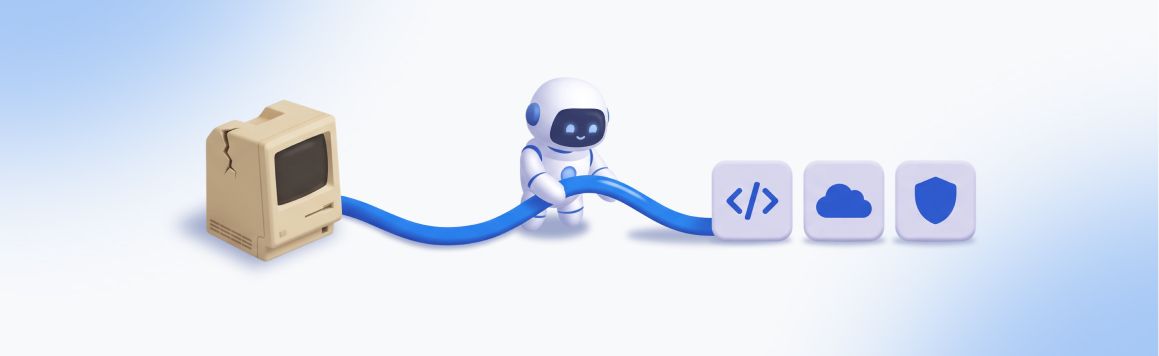
Legacy system integration means connecting the old system to new tools through APIs or middleware, without changing its core. It is the fastest route to value and often the first step.
The Real Cost of Standing Still
The old system's invoice is the smallest part of what it costs you. The bigger costs sit below the waterline, spread across budgets that never get added up.
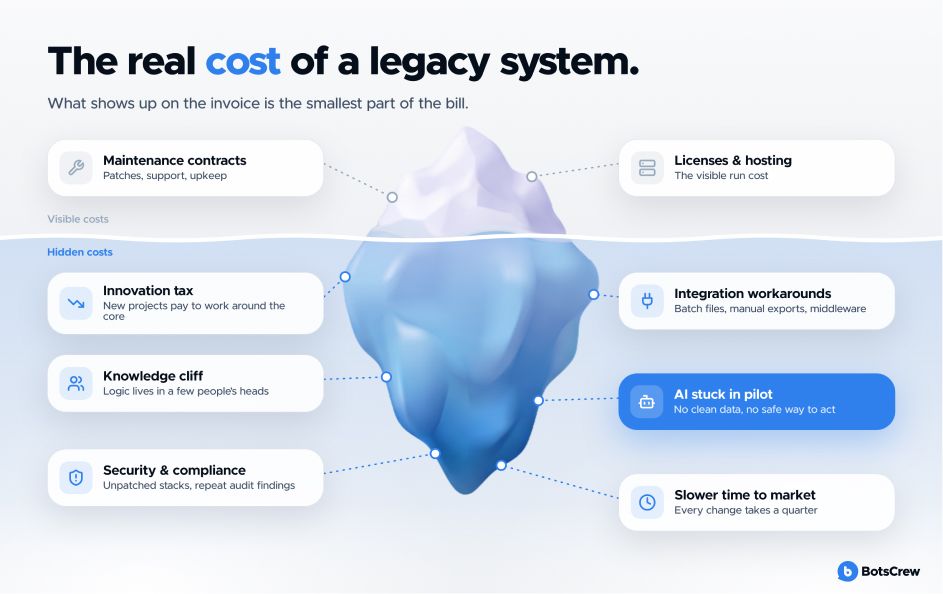
Most companies aren't running their business on new software. They are running it on systems built decades ago. McKinsey estimates that up to 70% of the software Fortune 500 companies use is 20 or more years old.
Keeping those systems alive eats most of the IT budget. One large European bank spent 70% of its IT capacity just maintaining legacy systems. US federal agencies spend about 80% of their $100B+ annual IT budget on running and maintaining existing systems.
Put simply: for every dollar spent on IT, 70–80 cents go to keeping the old stuff running. Only what's left goes to anything new.
Here is where that money really goes.
1. The innovation tax
Every new project has to work around the old system, and that costs extra time and money. 30% of CIOs say more than a fifth of their budget for new products ends up spent on fixing old technology instead.
2. The knowledge cliff
In many companies, only two or three people understand how the old system works. Nothing is written down. It's all in their heads. When they retire or leave, that knowledge leaves with them. After that, even small changes become slow, risky, and expensive.
3. Security and compliance exposure
Old systems often run on software that no longer gets security updates. That leaves known weak spots open to attackers. For companies in healthcare, finance, or insurance, it also means the same audit problems every year and growing compliance costs.
4. The integration wall
New tools need to share data instantly. Old systems usually share it once a day, through file exports. So your online store shows products in stock that sold out hours ago. Your support team can't see order status without logging into a separate old system. Every new tool you add needs its custom connection, and each one is another thing that can break.
5. AI that never leaves the pilot
AI only works as well as the data it can reach. If your order data updates once a night, product details sit in PDFs, and records can only be changed in an old system, AI can't do real work. You get an impressive demo, but nothing that runs in daily operations.
Legacy System Modernization Approaches: The 7 Rs, Explained Plainly
Most legacy system modernization approaches range from changing where a system runs to changing what it is. The deeper the change, the more value you get, and the more risk you take on.
The industry calls these "the 7 Rs." Cloud providers and consultancies label them slightly differently, but the options are the same.
Two more decisions sit outside the spectrum but matter just as much: retain (leave a stable, low-value system alone for now) and retire (switch off what nobody needs).
| Approach | What changes | Effort & risk | When it fits | Watch out for |
|---|---|---|---|---|
| Encapsulate | Nothing inside. You wrap the system in APIs so new tools (and AI agents) can use its data and functions | Low | Core logic is sound, but nothing can talk to it | APIs inherit the old system's speed and data quality |
| Rehost ("lift and shift") | Infrastructure only: same app, new servers or cloud | Low | Data center exit, hardware end-of-life | Moves your tech debt to the cloud and bills you monthly for it |
| Replatform | Runtime or database swapped (e.g., to managed cloud services) with minimal code changes | Low–medium | Running costs and scalability are the main pain | Scope creep into a refactor nobody budgeted for |
| Refactor | Code is restructured and cleaned up, behavior stays the same | Medium | The app is worth keeping but too hard to change | Needs strong test coverage to prove nothing broke |
| Rearchitect | The system is broken into modules or services with new interfaces | Medium–high | You need to scale, release faster, or let teams work independently | Distributed complexity if the domain isn't well understood |
| Rebuild | Rewritten from scratch, keeping scope and specs | High | The code is beyond saving but the process is unique to you | Requirements hidden in old code get lost |
| Replace | Retired and swapped for an off-the-shelf or SaaS product | Medium–high | The process is standard (HR, accounting, CRM) | Heavy customization recreates the old system inside the new one |
Legacy System Modernization Strategies: How to Sequence the Work
If approaches answer "what do we do to this system," legacy system modernization strategies answer "in what order, at what pace, and with how much risk."
Big-bang vs. incremental vs. parallel run
Every modernization program has to choose how to switch from old to new: all at once, step by step, or side by side. Each option trades speed against risk.
Big-bang. You build the new system and switch everything over on a single cutover date. The upside is one transition and no need to maintain two systems. The downside is that all the risk lands on one day, and you see no value until the very end.
Incremental (“strangler fig”). You move one capability at a time to new components until the old core can be switched off. You get value within months, and any risk stays contained to small slices. The trade-off is that old and new systems must run together for a while, which requires solid integration architecture.
Parallel run. You run old and new systems side by side and compare their outputs before switching. This gives the highest confidence for critical calculations like billing, claims, and payroll. But it’s expensive, since your team runs two systems for the whole overlap period.
For most organizations, the answer is incremental, with a parallel run reserved for the few processes where a wrong number is unacceptable. Big-bang works for small, well-understood systems.
5 questions that pick your strategy for you
#1. What does the business need in the next 12 months? A new channel, an AI use case, a compliance deadline? Start with the system that blocks it.
#2. How well do we understand what the system does? Low understanding means discovery first, code second.
#3. How much downtime can we tolerate? Near-zero means incremental plus parallel run.
#4. Where does the data of record live? Decide the source of truth for each data type before moving anything.
#5. Who owns the outcome? Modernization without a business owner turns into a technology project that never ends.
Your answers to these questions will narrow your options to one or two real choices.
Need an honest list for your stack?
Our Discovery Phase maps your systems, data, and dependencies and ends with a prioritized roadmap and costed first slice.
Start With a Discovery PhaseLegacy Modernization With AI: Faster, If You Use It Right
The slowest, most expensive part of modernizing an old system has always been understanding it. Reading code nobody documented, interviewing the people who remember why a rule exists, tracing which batch job feeds which report. That's exactly where generative AI is strongest.
McKinsey describes a bank that had tried for years to modernize its mainframe. Using orchestrated AI agents to migrate 20,000 lines of code, it cut a 700–800-hour estimate by 40%, and the dependency-mapping step dropped from 30–40 hours to about five.
Code comprehension. AI reads legacy code and explains it in plain language, mapping dependencies and showing which parts call which. People still decide which behavior is a feature worth keeping and which is a bug.
Business-rule extraction. AI pulls the rules buried in code, logs, and interview transcripts and turns them into readable specs. People confirm whether those rules still reflect how the business should work.
Documentation. AI generates documentation for systems that never had any. People make sure it stays the single source of truth after go-live.
Test generation. AI writes unit and regression tests that capture how the system behaves today. People define what "correct" means for edge cases.
Code translation. AI converts old languages and frameworks into modern ones. People own the architecture, the security review, and sign-off on every change.
Data mapping. AI matches fields across old and new schemas and flags inconsistencies. People choose which system is the source of truth for each type of data.
How to Choose Legacy System Modernization Services
The market for legacy modernization services is crowded. Global integrators, cloud partners, offshore shops, and AI-native firms all use the same words on their websites. The differences show up in how they work, so evaluate the work, not the pitch.
What good looks like
👍 Discovery before estimates. A credible partner won't quote a fixed price for a system they haven't looked at. They'll propose a short, paid discovery that ends with a roadmap you own, whether or not you continue with them.
👍 A business case, not a technology case. Every slice should map to a metric your CFO cares about: cost to serve, time to market, revenue, risk.
👍 Integration depth. Ask for examples with your actual stack (NetSuite, SAP, Dynamics, Salesforce, mainframe, custom). Generic "we integrate with everything" is not an answer.
👍 AI used with judgment. They should explain where AI speeds them up, where they don't trust it, and how humans review its output.
👍 Security and compliance built in. Look for SOC 2-aligned delivery, ISO 27001, HIPAA or GDPR experience where relevant, and access controls designed in from day one.
👍 Adoption in scope. Training, change management, and post-launch support should sit in the proposal.
Questions to ask on 📞 the first call
- What would you need to see in our systems before you could give us an estimate?
- Tell us about a modernization project that didn't go to plan. What happened, and what did you change?
- How do you decide which parts of our system to keep, wrap, refactor, or retire?
- Who owns the code, data, prompts, and documentation at the end?
- How will we know, three months in, whether this is working?
Green flags vs. red flags
Most vendors sound the same on paper. These signals show which ones will deliver.
Switch to compare them point by point.
- Asks about your business goals before your tech stack
- Proposes a small, measurable first slice
- Shows case studies with numbers and named clients
- Is candid about what AI can’t do
- Hands over documentation and knowledge as you go
- Plans for adoption and training
- Leads with a tool or platform license
- Proposes a multi-year big-bang rewrite on day one
- Only shows logos and generic “digital transformation” claims
- Promises AI will “automatically modernize” your code
- Keeps architecture knowledge inside their team
- Treats go-live as the finish line
How BotsCrew Approaches Legacy System Modernization
We've been building AI for enterprises since 2016, and almost every project eventually runs into the same wall: the legacy core. So our legacy system modernization services start from a simple question: what does your business need to do next that today's systems won't let it? Then we modernize exactly the layers that stand in the way, no more.
Here's how an engagement usually runs:
→ Assess. An AI Readiness Assessment or a Discovery Phase maps your systems, data, processes, and people, and scores where modernization pays back first.
→ Prioritize. We pick an approach per system and one first slice with a clear metric: cost per request, response time, hours saved, revenue unlocked.
→ Prove on real data. Pilots run on your data as it is, contradictions and all, so the results tell you something true.
→ Integrate and build. We connect to the stack you already run (ERP, CRM, data warehouses, e-commerce, support tools) with clean APIs and a governed data layer, then build the AI agents, copilots, and workflows on top.
→ Adopt and scale. We stay for training, change management, monitoring, and the next slice, because a system nobody adopts is a system that didn't ship.
What that gives you:
What that gives you
Enterprise-grade from the first sprint
Security, compliance, and access controls are part of delivery from day one, not added at the end.
- SOC 2-aligned delivery
- HIPAA
- GDPR
- ISO 27001
- SSO
- RBAC
- Audit logging
Model-agnostic architecture
The model is chosen per use case, so each workflow runs on the one that fits it best.
- Claude
- GPT
- Llama
- Open-weight models
A track record you can check
Clients include
- Samsung NEXT
- Honda
- Natera
- Kravet
- and more
Whether you need legacy application modernization services for one critical system or an enterprise application modernization program across a portfolio, we'll start small, prove value fast, and only scale what works.
FAQ
- What is legacy system modernization?
Legacy system modernization is updating or replacing outdated software, data, and infrastructure so they support current business needs, through approaches such as encapsulating with APIs, rehosting, replatforming, refactoring, rearchitecting, rebuilding, or replacing, usually in phases that keep operations running.
- How long does legacy software modernization take?
It depends on scope. A first slice (one integration layer, one use case) can reach production in weeks to a few months. Full legacy software modernization of a core system is usually a multi-year program. McKinsey notes that large programs have traditionally taken five to seven years, which is exactly why phased delivery matters.
- Which approach should we choose?
Start with what the business needs in the next 12 months. Encapsulation and replatforming deliver the fastest returns; refactoring and rearchitecting fit systems you'll keep for years; replacement fits standard processes. A good application modernization strategy mixes several across your portfolio.
- Is legacy system migration the same as modernization?
No. Legacy system migration moves a system or its data to a new environment. Modernization changes how the system works so it can keep evolving. Migration is often one step inside a modernization program.
- Can AI modernize our legacy code automatically?
Not on its own. AI is excellent at understanding old code, extracting business rules, writing documentation and tests, and drafting translations. Architecture decisions, business validation, and security review still need experienced people. Fully automatic translation tends to carry old problems into a new stack.
- Should mid-size businesses modernize differently from enterprises?
Yes. Mid-size companies usually get the best return from an integration layer plus one high-value use case that pays back within a fiscal year. Enterprises need portfolio-level prioritization and repeatable delivery across many systems.
Ready to find out what’s actually possible with your legacy systems?
Book a 30-minute consultation. We’ll walk through your stack, where it’s blocking growth or AI, and what a realistic first slice would look like.
Schedule Your Free Consultation