Claude for Marketing: 5+ Use Cases From Our Team & How to Set Them Up
Claude for marketing in practice: how our team creates case studies, website pages and SEO articles in hours instead of weeks, with prompts you can copy.


What if a case study took an afternoon instead of two weeks, and a new landing page didn't have to wait for a developer? That is how our marketing team at BotsCrew works today.
At the start of 2026, everyone on the team already used AI, but each person used it alone, with personal prompts and chats. In Q2 the whole company switched to one tool, Claude. The individual hacks turned into shared processes.
This article covers the five most common marketing use cases: what we do, how Claude helps, how much time it saves, and how to set up something similar yourself. Each use case includes a prompt you can copy and adapt.
In short:
Claude for marketing works best on repeatable tasks with clear sources. Our team uses it for case studies, website pages, AI-search articles, a link-building tool and a daily digest:
📝 A case study now takes up to 5 hours instead of 1–2 weeks.
📝 A blog post takes about 40 minutes to publish instead of 2–3 hours.
📝 A custom sales page goes from design to live in 2–3 hours instead of weeks.
📝 A link-building tool built by a non-developer saves approximately 1–2 hours a day.
📝 A daily digest turns email, Slack and call notes into one to-do list before the workday starts.
*BotsCrew is an enterprise AI consulting and implementation partner, founded in 2016, with 200+ projects delivered. In October 2026, we reached the Select tier of Anthropic's Claude Partner Network, so this article isn't a review of Claude from the outside, but a look at how a certified partner works with it every day.
The foundation: instructions, context and playbooks
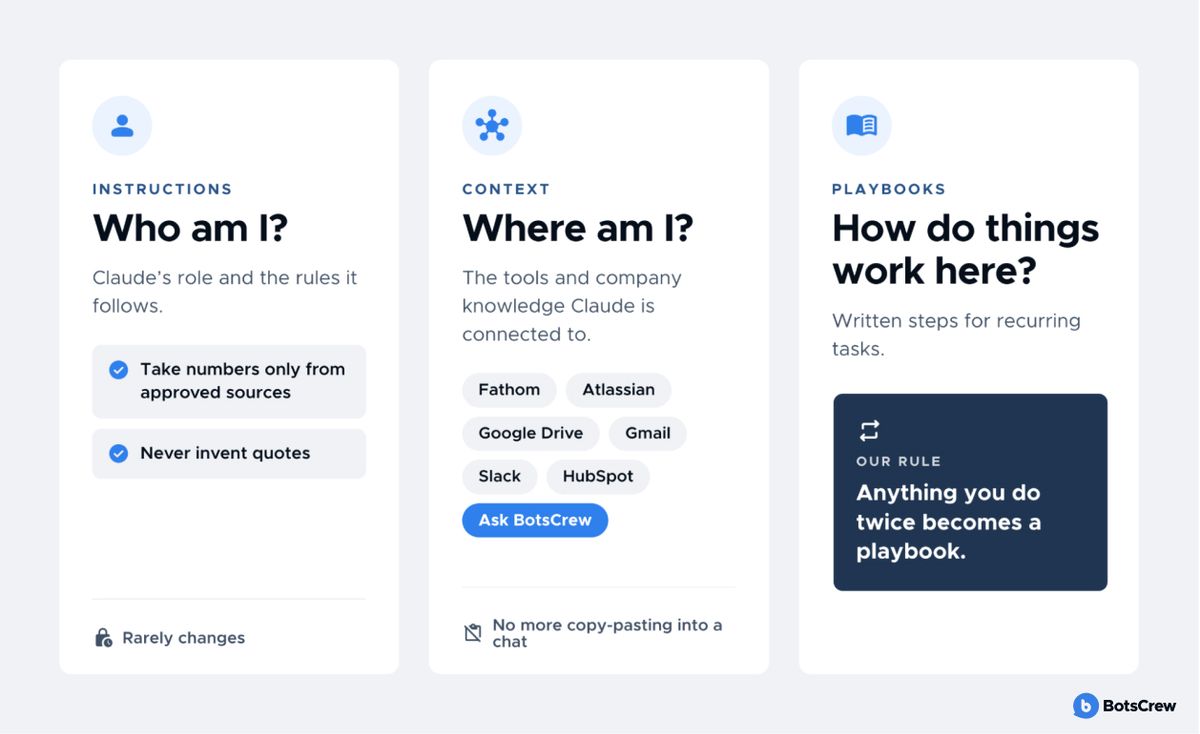
AI becomes useful for a team, not just one person, once three things are in place. Picture a very smart new hire who has read every book but knows nothing about your company. Before doing good work, they need answers to three questions: who am I, where am I, and how do things work here?
🧠 Instructions answer "who am I." They tell Claude its role and the rules it follows, such as "take numbers only from approved sources" or "never invent quotes." They rarely change.
🗺️ Context answers "where am I." Our marketing team connects Claude to Fathom (call recordings), Atlassian (Jira and Confluence), Google Drive, Gmail, Slack and HubSpot. An internal project called "Ask BotsCrew" adds company-wide knowledge. Without these connections, you spend your time copying and pasting into a chat.
✍️ Playbooks answer "how do things work here." They are written steps for recurring tasks. Our rule: anything you do twice becomes a playbook.
We work mostly in Claude Projects and Claude Cowork, use Claude Design for visuals, and Claude Code when something needs to be built.
#1. How do we write a case study with Claude in up to 5 hours?
Case studies are some of our strongest sales material. For a B2B buyer choosing an AI vendor, a project with real numbers is the best proof that we can deliver. Our sales team even builds proposal decks from a bank of approved case studies. Yet they were one of our slowest content formats to produce.
A good case study needs the project context and details: the client's problem, what we built and how, the tech stack, the timeline, measurable results and the client's words about the work. All of this lived with the project team, spread across Jira tickets, Confluence pages and client calls, and the people who knew it were busy with client work. Every case study meant interrupting engineers and PMs for numbers and feedback, then waiting for answers. Client quotes added one more hurdle: anything that revealed confidential details had to be caught before it went public.
How it was before: Claude works as an AI case study generator that draws on our systems instead of a blank prompt. For instance, we needed detailed information about the project itself: its features, the technologies behind it and the solutions we chose. We either searched for it by hand across documents, proposals and presentations, or asked PMs and account managers the same questions again and again. Only then could we write the text and send it to a designer. Gathering information, writing and design took 1–2 weeks.
How it works now: we needed an urgent case study about an AI safety assistant for journalists that we built for a client. The process looked like this:
→ Claude gathered the project details from Jira and Confluence.
→ It wrote the case study text, which we then proofread and edited by hand.
→ Through Fathom, it found client feedback and quotes from calls. It also sorted out which quotes could go public and which couldn't, for example because they revealed confidential details about how the client works.
→ In Claude Design, we laid out the case study on the BotsCrew brand system, polished a few details and exported it as a PDF. The same file can go to Google Slides or .pptx.
The same flow works for presentations, client materials and reports.
Prompt you can adapt:
I'm writing a case study about [project name] for our website. Using Jira, Confluence and our Fathom call recordings, gather: the client's problem, what we built, the tech stack, timeline and measurable results.
Then find client quotes from calls that could work as a public testimonial. For each quote, mark whether it is safe to publish or contains confidential details, and explain why.
Write the case study in this structure: challenge, approach, solution, results. Use only numbers you found in the sources and name the source for each. If a number is missing, write [missing] instead of guessing.
Before: 1–2 weeks of gathering information, writing and design.
With Claude: up to 5 hours, including our proofreading.
Have a process that needs more than a prompt?
Share your challenge, and we’ll come back with a clear plan, timeline and cost estimate.
Start a project#2. How do we build website pages with Claude Design and Claude Code?
Apart from client referrals, about 90% of our new business comes in through the website. So when BotsCrew started repositioning around AI consulting, the site had to keep up: new service and landing pages, sharper messaging, steady SEO work. It couldn't. Almost every update needed a developer, and developers were busy with client projects. Landing pages stalled, SEO opportunities slipped by, and small fixes sat in a queue.
How it was before: the website was a mix of two setups. The blog and case studies ran on WordPress, so marketing could publish them without developers, but the platform's design limits made every blog post take 2–3 hours. Everything else, including service, sales and landing pages, was custom-coded. Each new page needed a designer and then a developer, so marketing couldn't make even small edits on its own, and website work was pushed back whenever engineers were busy with client projects. SEO work waited behind all of this.
How it works now: we rebuilt the website with a clear split of jobs. Sanity, a headless CMS, holds the content, and marketing publishes there directly. Claude builds and improves the front end:
— Migration. Instead of moving pages by hand, we wrote custom skills that describe how old content maps to the new structure, including unique page styles, images and custom blog elements. Claude Code then migrated the pages and the full blog archive, and the team reviewed the result.
— New pages. The page copy starts in a Google Doc. We drop the text into Claude Design and pick the BotsCrew design system, so the page matches the rest of the site. Then we share the design from Claude Design straight to Claude Code, which turns it into a production-ready page. After a few adjustments, the page can be live within an hour or two. Designers and developers review the output instead of producing it.
— Ongoing changes. Instead of a ticket queue, the team writes short specs that are ready to hand to Claude. The clearer the spec, the faster Claude turns it around.
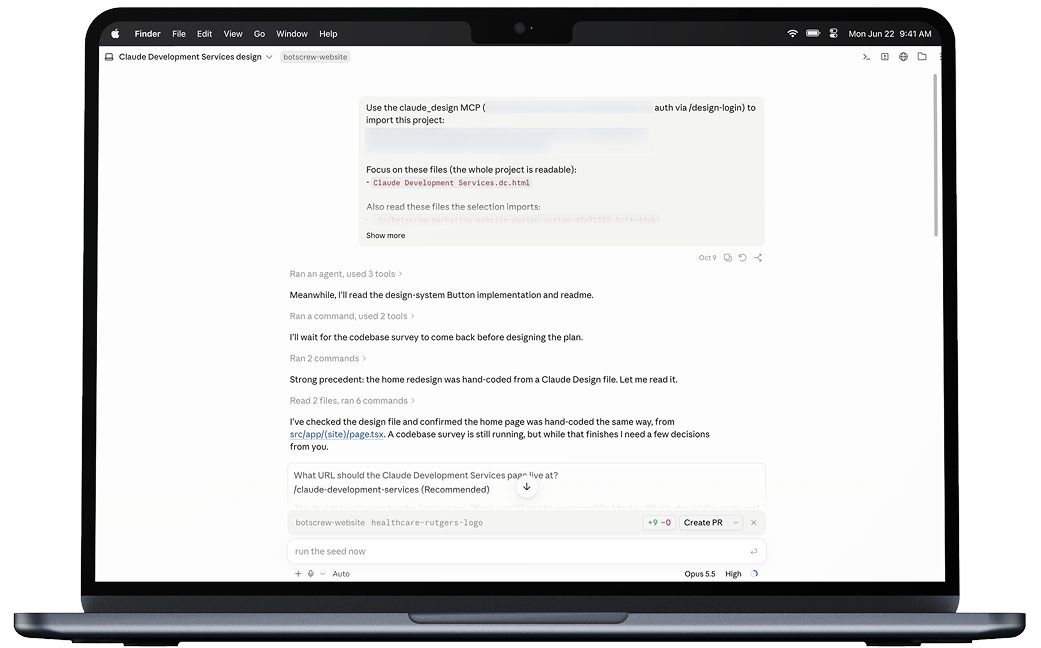
Our internal workflow uses two prompts.
In Claude Design, with the website code, the Figma file and the spec attached:
Design a new page for the BotsCrew marketing website based on the .docx spec prepared by the Marketing Department. The page should look modern and match the overall feel and styles of other pages to look consistent.
Then the design goes to Claude Code, run in Plan mode, with:
Your task is to implement a new page in the BotsCrew marketing website based on the generated prototype HTML page by converting the prototype into a proper, production-ready page.
Before: weeks for a custom sales page, a developer for every small change.
With Claude: 2–3 hours to publish a sales page, about 30 minutes for a blog post, minutes for small changes, all done by marketing. We are still measuring the effect on traffic and SEO, since the new website went live recently.
#3. How do we use Claude for SEO and AI search?
B2B buyers nowadays increasingly skip the search results page. They ask ChatGPT, Gemini or Perplexity who to hire to build an AI agent, and get a short list of a few vendors with a sentence about each. Google's AI Overviews do the same at the top of the results. If BotsCrew isn't on that list, the buyer may never visit our website, however well we rank.
This changes what a good article is. Classic SEO content is built around keywords and written to keep a reader scrolling. AI assistants look for something else: a clear answer they can lift, sections that make sense out of context, numbers with a source and a date, and comparisons laid out as tables. An article can rank on Google and still never be quoted.
It's also harder to measure. A mention inside a ChatGPT answer doesn't show up as a click in Google Analytics, so we needed a separate way to see whether assistants name us at all.
How it was before: articles started from keywords. Checking which questions were worth targeting meant an afternoon of exports and spreadsheets.
How it works now: one writer runs a 4-stage process, with Claude as a research and editing partner. Claude is connected to Ahrefs through MCP, so it pulls search data directly. The writer makes the decisions and owns the text.
— Research. Claude suggests 10 questions a buyer would actually ask an AI assistant, checks each one in Ahrefs for search volume and difficulty, and suggests which to keep. The writer makes the final pick of 5–8. Questions that match prompts we track in HubSpot AEO always stay, because we can measure them.
— Writing and review. Claude prepares a first draft against our fixed structure: the answer on the first screen, sections that make sense on their own, comparison tables, sourced statistics and FAQs. The writer then rewrites it in our ToV and adds what AI can't: our project data, engineers' expert opinions and real examples from client work. The writer also checks every statistic against its original source. Finally, Claude reviews the text against the same structure and flags anything the writer may have missed.
— Promotion. Claude suggests which published articles are worth reusing and drafts versions for LinkedIn, YouTube and the newsletter. The writer decides what goes out and edits each piece for its channel. On Reddit, only real practitioners from our team answer, under their own names.
— Measurement. Every month, we review AI visibility in HubSpot AEO, and the traffic and leads it brings in Google Analytics.
Prompts from our internal guide, used in order:
I'm writing an article on [topic] for BotsCrew, aimed at [enterprise CTOs / heads of CX / manufacturing ops], at the [TOFU / MOFU / BOFU] stage. Give me 10 questions a buyer would actually type into ChatGPT, Gemini, or Perplexity on this topic. Mix definitional, comparative, cost, and "is this right for my situation" phrasings. Write them the way a person prompts, not the way an SEO writes a keyword.
Run these 10 questions through Ahrefs. For each, give me the search volume, keyword difficulty, and the closest-matching terms and search suggestions. Then tell me which 5–8 to keep: I want the ones with real search demand that we can answer better than a generic source. Flag any that are too competitive to be worth targeting.
Here are the 6 questions I'm keeping. Draft an outline where each is a self-contained section. Flag which need a comparison table, and which need our own project data to be worth citing.
Before: an afternoon of exports and spreadsheets to validate a question list.
With Claude: a validated list in minutes, and one writer covers research, drafting, review and repurposing. We're still collecting the results on AI citations and leads.
#4. How did a non-developer build a link-building Chrome extension with Claude?
Link building is one of the slowest parts of SEO. To rank higher, we need reputable websites to mention and link to BotsCrew, and each mention is a negotiation by email: pitching, following up, agreeing on terms. That means dozens of emails a day with hundreds of different sites. Every reply raises the same question before any real work can start: have we dealt with this website before, and how did it go?
How it was before: the hard part wasn't the emails but remembering each site's status. We already work with this one, that one declined, this one needs a follow-up in a month. The database lived in a Google Doc, so every reply started with Ctrl+F.
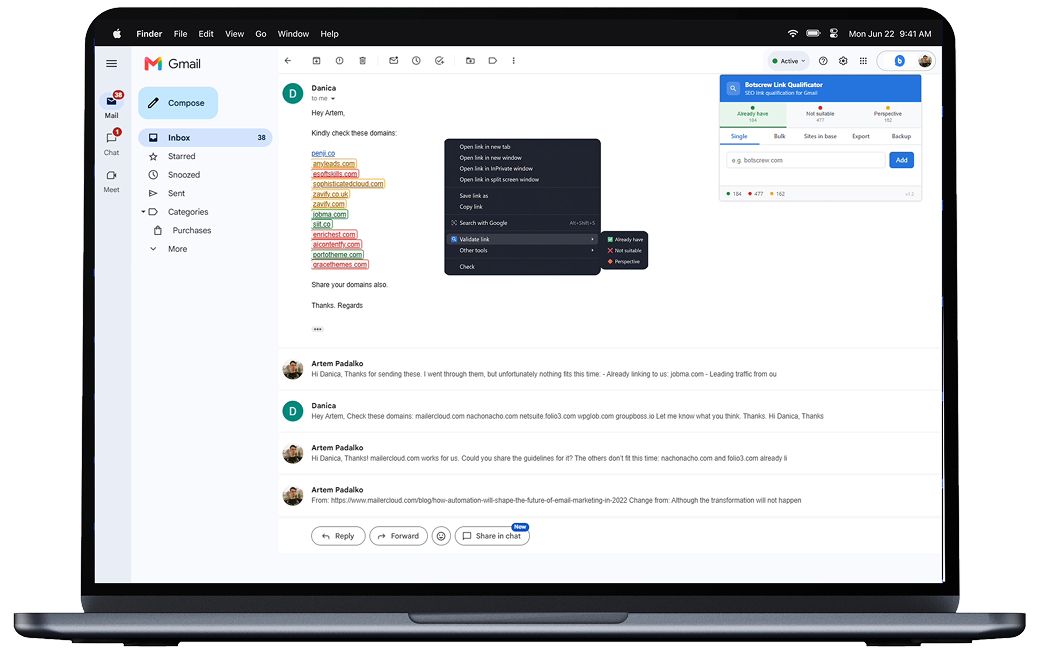
How it works now: our employee described what he wanted to Claude in plain words, in an ordinary chat, and sent screenshots whenever something broke. Claude wrote all the code. The result is a Chrome extension that highlights domains right inside Gmail:
🟢 green for "already have it"
🔴 red for "not a fit"
🟡 yellow for "promising."
To tag a new website, he selects it and picks a color from the right-click menu. The database holds 800 domains, and each one's status is visible the moment he opens an email. He also says a long list of sites in an email no longer feels overwhelming.
Prompt you can adapt:
I'm not a developer. I want a Chrome extension that highlights website domains inside Gmail emails based on a list I keep.
Each domain has one of three statuses: green = already working with us, red = not a fit, yellow = promising. When I select a domain in an email, I want to set its status from the right-click menu. The list should be saved in the browser so it survives a restart.
Write the full code and give me step-by-step instructions for installing it in Chrome. I'll send screenshots if something doesn't work.
Before: 1–2 hours a day spent checking the spreadsheet.
With Claude: the status is visible right in the email, with no extra steps.
Your AI rollout deserves a team that uses AI to grow its business.
We don’t just advise Claude, we work on it every day. We’ll help you connect the right tools, set up the first projects and turn early wins into company-wide playbooks.
Talk to our Claude experts#5. How do you set up a daily digest with Claude scheduled tasks?
On any given morning, a marketer's inbox holds replies from partner websites, notifications from ad and analytics platforms, industry newsletters and requests from colleagues. Only a few of these need action today, but finding them means opening and skimming everything.
Email is also only part of the picture. Follow-ups get promised in Slack threads and action items get agreed on calls, and they're easy to lose between tools. The real cost isn't the time spent reading, but the reply that never got sent and the task that slipped because it lived somewhere nobody checked that day. This is the simplest of our use cases and the easiest to copy.
How it was before: every morning started with scrolling the inbox and deciding what mattered.
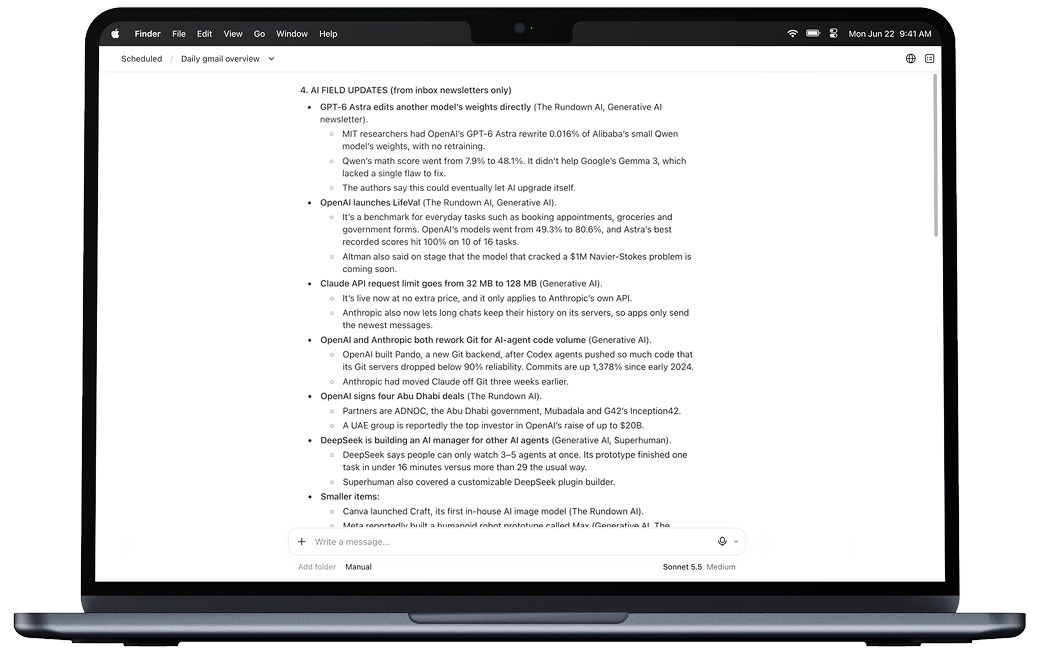
How it works now: every morning, Claude groups emails into categories the employee defined herself, such as what needs a reply, what to pass to a colleague, and what AI industry news came in through newsletters.
The setup gets more useful with more sources. Connect Slack, and Claude checks yesterday's conversations for anyone still waiting on you and anything you promised to do. Connect a call notes tool such as Granola, and it adds the action items you agreed on. You start the day with one to-do list that pulls everything together.
Prompt you can adapt (set it to run every weekday morning):
Every weekday at 9:00, go through my Gmail from the last 24 hours and group the emails into these categories:
- Needs my reply today
- Worth forwarding to a colleague (suggest who)
- AI and marketing industry news from newsletters, one line each
- Everything else, as a count only
Then check Slack for messages from yesterday where someone is waiting for my answer or where I promised to do something. End with one combined to-do list for today. Don't reply to or send anything yourself.
Before: the first part of the day went to sorting the inbox.
With Claude: one list in the morning, ready before you open your email.
What we always check by hand
AI speeds up a lot of marketing work, but it doesn't run on autopilot. Here is what we've learned:
#1. Always review the output. We still proofread every case study or text by hand. The less context Claude gets, the more editing you'll need. If you haven't read and checked the result, there's a good chance you're shipping AI slop.
#2. Never let it invent numbers. Our rule is to take figures only from named sources: Jira, call recordings, approved case studies, Ahrefs. In prompts, we ask Claude to mark a missing number as [missing] rather than fill the gap.
#3. Check what can be made public. Claude can sort client quotes into safe and confidential, but a person makes the final call on what goes on the website.
#4. Every tool has limits. Each connector can do only what its integration allows. Find out the limits up front and design the process around them.
#5. Choose the simplest solution that works. Not every task needs a complex setup. A scheduled task is enough for a daily to-do list, while link building worked best as a browser extension.
#6. Fix the instructions, not just the result. When Claude gets something wrong, explain the mistake in the chat, then add the rule to the project instructions so the fix applies to every new chat.
Where can Claude take marketing next?
The five use cases above are a start. Other teams' patterns and new Claude features show where marketing can go further.
🔁 Templates that improve themselves. Our sales team builds proposal decks in Claude Design from a master template, with a bank of approved case studies that Claude takes numbers from. When a new deck turns out better than the template, the winning design choices go back into it. Marketing can use the same approach for one-pagers, client materials and reports.
🎬 Video without a video team. Our AI-search playbook calls for at least one YouTube video a month. Claude Motion, released in beta on October 8, 2026 for Team and Enterprise plans, turns data and text into short animated videos that can be edited and exported as MP4. It fits explainers and animated charts from reports.
📊 Reports that write themselves. The same scheduled tasks that build an email digest can pull monthly numbers from Google Spreadsheets, Docs, Hubspot, Ahrefs, etc. into one report. The team's time then goes to conclusions instead of formatting.
📚 Playbooks shared across the company. Our project managers already keep a shared page of playbooks and skills that anyone can adapt to their own project. Marketing playbooks can live the same way, so a new team member starts with the team's best practices on day one.
Can a marketing team without developers do this?
Yes. Three of the five use cases need no developer at all: case studies, AI-search articles and the daily digest run on connectors and prompts. The Chrome extension was built by a link-building specialist who doesn't write code. Website pages are the exception: Claude Code writes the page, but someone technical should still review the code and the deployment before a page goes live. The same goes for any connector that touches customer data.
How to set this up for your team
Start with one routine task you do every week in the same way: a report, a status update, a case study, a round of outreach emails.
Connect your work systems
Set up connectors to the places your context lives: your task tracker, knowledge base, messenger, call recordings, email and CRM. Official connectors give Claude controlled access to exactly the data it needs, which is faster and safer than pasting everything into a chat.
Create one shared project
Not for the whole company, but for one team or one recurring task. Let Claude write the first draft of the instructions itself, then review them (you'll find a prompt below).
Write down the boundaries
Define where Claude gets its numbers, what it can't change without your confirmation, and who makes the final decision. A rule like "don't send or publish anything until a person approves it" keeps automation safe.
Turn repeats into playbooks
If you've done something a second time, write it up as a playbook or a skill and share it with the team. That's how a personal hack becomes a team tool.
Show results to colleagues
We share what works in internal sessions and in a dedicated Slack channel. Whatever works for several teams becomes a company standard.
A realistic pace for the first two months: start with 2–3 real use cases, then add one more each week.
The prompt we use to set up a new project in Claude Cowork:
I want to create a Claude Cowork project for [team or task name]. Our team works according to the approach on this page [link to your wiki page]. Gather information from [call recordings, Slack, and all other available sources] and write a description and instructions for the project using the template from [link to template].
Then open Projects, create a new project, paste in the name, description and instructions Claude generated, and share it with your team.
FAQ
- How do marketing teams use Claude?
Marketing teams use Claude for repeatable work that draws on company data: case studies from project records, website pages through Claude Design and Claude Code, research and drafts for AI-search articles, small internal tools, and daily digests of email and Slack. At BotsCrew, a person still reviews every output before it is published or sent.
- Can Claude build website pages without a developer?
Yes, with a review step. Our marketing team designs pages in Claude Design on the BotsCrew design system, then Claude Code turns the design into a production-ready page, with content managed in a headless CMS.
- Is it safe to connect Claude to HubSpot, Gmail and Slack?
Official connectors give Claude controlled access to the data it needs, which is safer than pasting data into chats. On Claude Team and Enterprise plans, only organization Owners can add custom connectors. Add written rules on top: numbers only from named sources, and nothing sent or published until a person approves it.
- What can't Claude do in marketing?
Claude can't decide what is true or safe to publish. It can draft a case study, sort client quotes and suggest numbers, but a person checks every statistic against its source, approves what goes public, and edits the text into the brand's voice. Claude also works only within each connector's limits, so some steps stay manual.
Tell us which process slows your team down most.
On a free 30-minute call, we’ll show you what Claude can take over and what it would take to build.
Let’s build yours