Claude for Teams: How We Use It Across 5 Departments
How we set up Claude for HR, sales, finance, marketing, and engineering, plus the time it saves: 2+ hours per proposal deck and case studies in 2 hours.


TL;DR:
BotsCrew uses Claude as a shared teammate across five teams by setting up three things: instructions, context from connectors (Jira, Confluence, Slack, Fathom, Gmail, Google Drive), and playbooks for recurring tasks. Results so far: proposal decks take 2+ hours less each, case studies dropped from 1–2 weeks to about 2 hours, and link-building outreach saves 1–2 hours a day. Start with one weekly routine task, one shared project, and written rules for human approval.
Imagine a candidate you spoke with a few months ago comes back to you. You'd have had to dig up the call recording and notes and try to remember where things left off. At BotsCrew, Claude solves this in a few minutes: it pulls up the correspondence, analyzes the call in Fathom, our AI call recorder, and suggests what to pay attention to next.
We've highlighted how BotsCrew teams — engineering, PeopleOps, Sales, Finance, and Marketing — turned Claude into a full-fledged teammate, how much time it saves, and how to quickly automate similar tasks in your team.
What's ahead:
- how the rollout began and what the "Claude as a Teammate" approach is
- how to set up your first project
- how Claude helps with recruiting, sales, finance, marketing, and software development
- the limitations we've faced
- what to do to replicate this in your team.
👀 What does “Claude as a teammate” mean?
“Claude as a teammate” means Claude works inside a team's real systems under shared rules, instead of in one person's private chat. At BotsCrew, that takes three things: instructions, context, and playbooks.
At BotsCrew, we try to be AI-native not only in what we build for clients but also in how we work ourselves. That's why we've made AI knowledge sharing a regular part of company life: teams and individual teammates show each other what they've built, the hacks they have discovered, and how their AI setups work.
Not sure where your company stands with AI?
Before rolling out AI across teams, it's worth checking your foundations. Learn how to assess your strategy, data, technology, people, and governance, and why so many AI pilots stall before they scale.
Before these sessions, everyone was already using AI in some way, but mostly on their own, with personal prompts, chats, and tricks that rarely went beyond one person. Through the sessions, we realized that the first and simplest step toward using AI well as a team is to set up three things:
- instructions;
- context;
- playbooks.
Instructions explain to Claude who it is on the project and what rules it works by. Context comes from connectors to Jira, Confluence, Slack, Fathom, Gmail, and Google Drive. Playbooks are written-up scenarios for recurring tasks.
For instance, for every client project we create one Claude Project shared by the whole team: the tech lead, PM, QA, and engineers. The instructions spell out the main rule — answer from real systems, not from memory.
What has Claude taken off each BotsCrew team's plate?
Claude handles recurring work in five BotsCrew teams. The table lists each task, the setup behind it, and the measured result.
| Team | Task | Claude setup |
|---|---|---|
| PeopleOps | Candidate context, pre-screens, reference checks, onboarding plans | One chat per candidate in a Claude Project, plus Fathom |
| Sales | Proposal decks | Claude Design master template plus rules, a case-study bank, and a signatory list |
| Finance | Monthly reporting decks and dashboards | A reusable skill run on fresh data |
| Finance | 50+ contractor invoices and bank payment orders | Google Sheets, Apps Script, and Document Studio (built with AI help, before Claude) |
| Marketing | Case studies | Connectors, the “Ask BotsCrew” project, and Claude Design |
| Marketing | Link-building outreach | A Claude-built Chrome extension tracking 800 domains |
| Any team | Morning to-do digest | Claude Cowork scheduled task plus Slack and Granola |
| Engineering | AI build plans with 20–40 tasks | Kanban-board skill that outputs one interactive HTML file |
How do you set up Claude Projects and connectors for your team?
Setup takes three steps, and (drumroll) the hardest part — the instructions — Claude writes itself.
Step 1. Set up Claude connectors to your work systems
Without access to your work systems, Claude turns back into a chat you have to explain everything to. Our minimum stack: Atlassian, Fathom, Slack, Google Drive, Gmail, and Google Calendar.
Connectors run on the Model Context Protocol (MCP), an open standard for connecting AI assistants to work tools. Anthropic's guide to connectors explains how to add them.
Step 2. Ask Claude to gather the context
In a new chat in Claude Cowork, Anthropic's agentic desktop app for knowledge work, we send this prompt (you can adapt it to your needs):
"I want to create a Claude Cowork project for [project name]. Our team works according to the approach on this page [link to Confluence]. Gather information from Fathom, Slack, and all available sources, and write a description and instructions for the project using the template from the subpage."
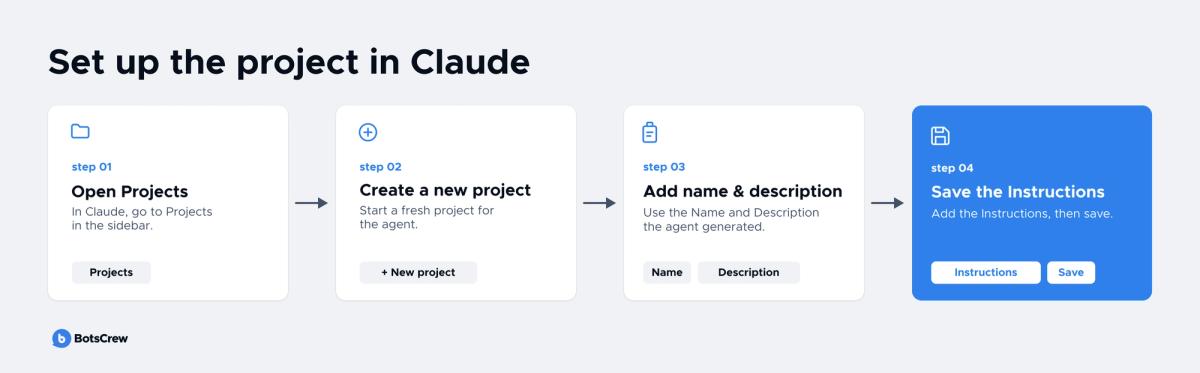
Step 3. Create the project
In Claude, open Projects → New project, paste the Name and Description the agent generated, and save the Instructions. If needed, the project can stay private or be opened up to the whole organization.
The plan for the first two months
We don't roll everything out at once. Each team follows a simple plan:
#1. Create one project per engagement and share it with the team.
#2. Start with 2–3 real use cases and add one more each week.
#3. Anything you do twice, turn into a playbook: a separate page and one line in the instructions.
#4. Show the results at the internal Spotlight.
#5. Make whatever works across several teams a company standard.
Buying AI tools is easy.
Getting the whole company to use them the same way is the hard part. BotsCrew helps enterprises with AI rollout and adoption, from choosing the right technologies to standardizing how teams work with them.
Claude for HR: how do we remember every detail from earlier candidate interactions?
In PeopleOps, Claude prepares the context and works through all the data in detail, while people make the decisions on candidates. After the workshop, the team reviewed how it uses AI in recruiting and pulled scattered tools together into a systematic process. Over the last quarter, the new employee attrition rate improved by 11%.
We keep a separate chat in a Claude Project for each candidate. All the context is collected there: CV, interviews, notes, and references. Claude helps prepare pre-screen questions, summarize post-interview feedback for the hiring manager, and analyze reference checks to spot potential risks.
Once an offer is accepted, we move all the candidate context into a dedicated Claude Project. Claude uses it to help build a personalized onboarding plan, so the manager has everything they need before the new teammate even starts.
❗️ We use Claude not to make decisions instead of the team. It helps us work with information faster and takes over a large part of the routine.
Claude for sales: how do we send a proposal on the day of the call?
The Sales team builds proposal decks in Claude Design, Anthropic's canvas-based design agent, from a ready-made template, which saves 2+ hours per deck. Previously, we built each deck almost from scratch: setting up the structure, hunting down case studies, double-checking numbers, and only then getting to the actual proposal content.
Then we took the strongest deck we'd ever sent to a client and turned it into a master template on the BotsCrew brand system. Next to the template sit three files that Claude reads on its own:
- instructions — what can and can't be changed in the deck;
- a bank of approved case studies — Claude takes numbers only from there;
- a list of signatories — so that made-up job titles or emails don't appear in the deck.
How we work with the template
→ We duplicate the template and rename it for the client.
→ We drop the Fathom call transcript, any case studies that aren't in the bank yet, background on the client, their logo, and even their brand colors into the chat.
→ Claude builds the deck and flags anything that's missing.
→ We review and polish it. Sometimes a few small tweaks do the trick; other times it takes a couple of rounds.
We've now built 7 proposals using this workflow. The template keeps evolving, too. Sometimes a new deck turns out better than the template itself, so we fold winning design choices back into the template. That way, Claude starts from them the next time around.
Claude for finance: how does our team automate reporting?
The finance team's month is built around recurring meetings: month-end close, updates for General Management, and Client Profitability Reviews. The structure is the same every time — only the numbers change. So the system was built around exactly that.
A skill is a set of instructions that generates exactly the output you need: a presentation or a dashboard. All it takes is uploading fresh data and running the skill. When reporting requirements change — for example, a new metric or a different data cut appears — the skill only needs to be updated once, and every subsequent run takes the changes into account. The time that used to go into formatting slides now goes into analysis, conclusions, and recommendations.
The first AI use case in Finance appeared even before Claude, back when the company had a corporate GPT. Every month, the team issues 50+ invoices to sole proprietors and prepares payment orders for two banks. Payment details lived in one file, amounts in another, and each bank has its payment order format.
For instance, a mistake in an IBAN, tax ID, or amount meant a payment bounced by the bank and a delayed payout. On top of that, every invoice then had to be filed by hand into each contractor's personal folder.
With AI's help, the team built an automated process in Google Sheets, Apps Script, and Document Studio:
#1. Formulas pull the payment details and amount into a row on the monthly tab — only 2 keys are entered by hand.
#2. Document Studio generates the invoice from a template and writes the status back to the spreadsheet.
#3. A script files the finished invoices into each contractor's folder.
#4. Separate sheets compile the payment orders in Universal Bank and PrivatBank formats — all that's left is to export the XLSX.
The result: 5–7 hours saved every month (almost a full working day) — and less chance of errors in payment details.
Spending too many hours on manual finance tasks?
BotsCrew can help you map the process, test an automated workflow with a prototype, and take it all the way to launch.
How does marketing write a case study in two hours?
Gathering information, writing, and designing a case study used to take one to two weeks — now it takes up to two hours. The main change: marketing no longer has to pull the project team away from their work to get the details.
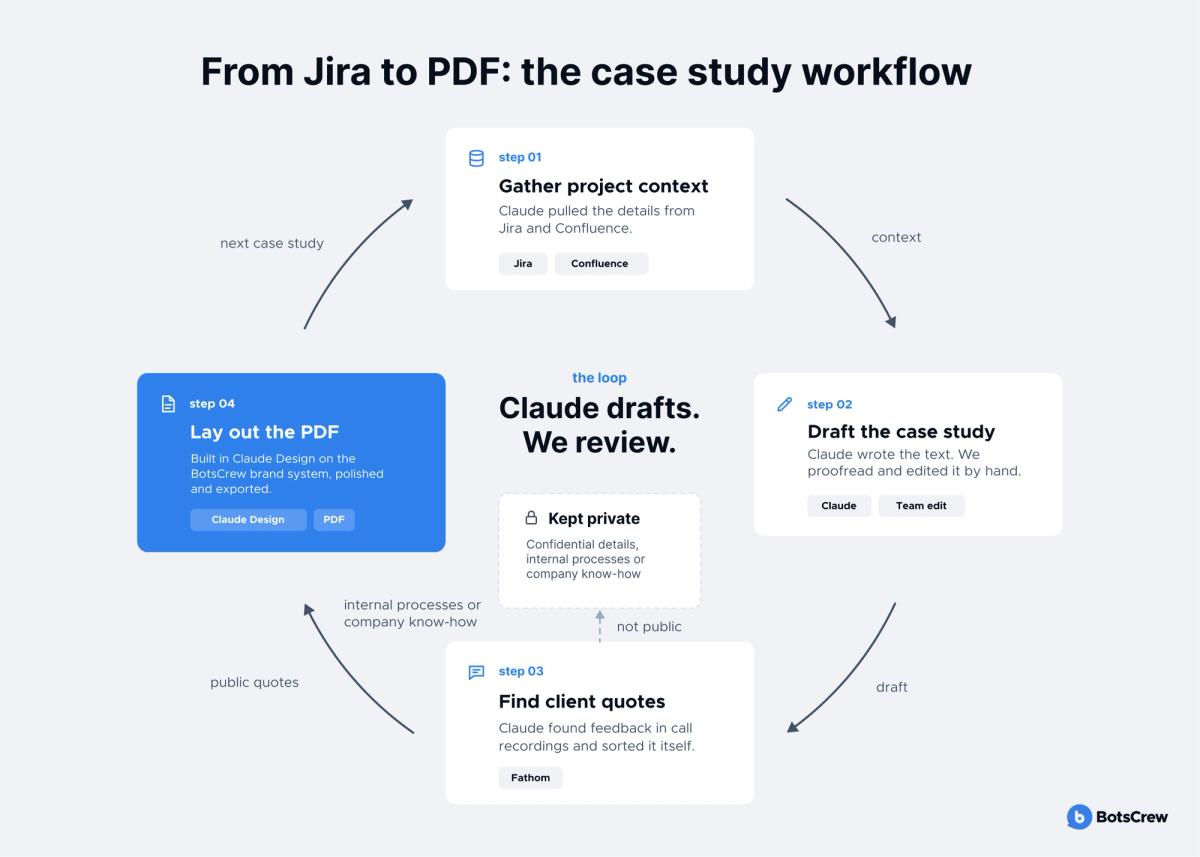
In marketing, Claude is connected to Fathom, Atlassian, Google Drive, Gmail, Slack, and HubSpot, and the internal "Ask BotsCrew" project gives it access to company context. For example, we urgently needed a case study about an AI safety assistant for journalists that we built for one of our clients. The process looked like this:
→ Claude gathered information about the project from Jira and Confluence.
→ It wrote the case study text, which we then proofread and edited.
→ Through Fathom, it found client feedback and quotes from calls. It even sorted on its own which quotes were suitable for a public testimonial and which weren't — for example, because they contained overly confidential information, could reveal sensitive details of how the company works or how its internal processes are built, and couldn't be made public.
→ In Claude Design, we laid out the PDF on the BotsCrew brand system, polished a few details, and exported the file.
Presentations, client materials, and reports can be prepared the same way.
We also have a team member who does link building and handles dozens of website emails every day. The main pain point isn't the emails themselves, it's memory: we already work with this website, this one declined, this one needs a follow-up in a month. The database lived in a Google Doc, so before every reply he had to hit Ctrl+F.
He described what he wanted to Claude in plain words, sent screenshots whenever something broke, and ended up with a Chrome extension. It highlights domains right in Gmail: green for "already have it," red for "not a fit," yellow for "promising." To tag a new website, he just selects it and picks a color from the right-click menu.
The database holds 800 domains, and each one's status is visible the moment he opens an email. That saves 1–2 hours a day that used to go into cross-checking the spreadsheet. It's also just easier on the brain: a long list of sites in an email is no longer intimidating.
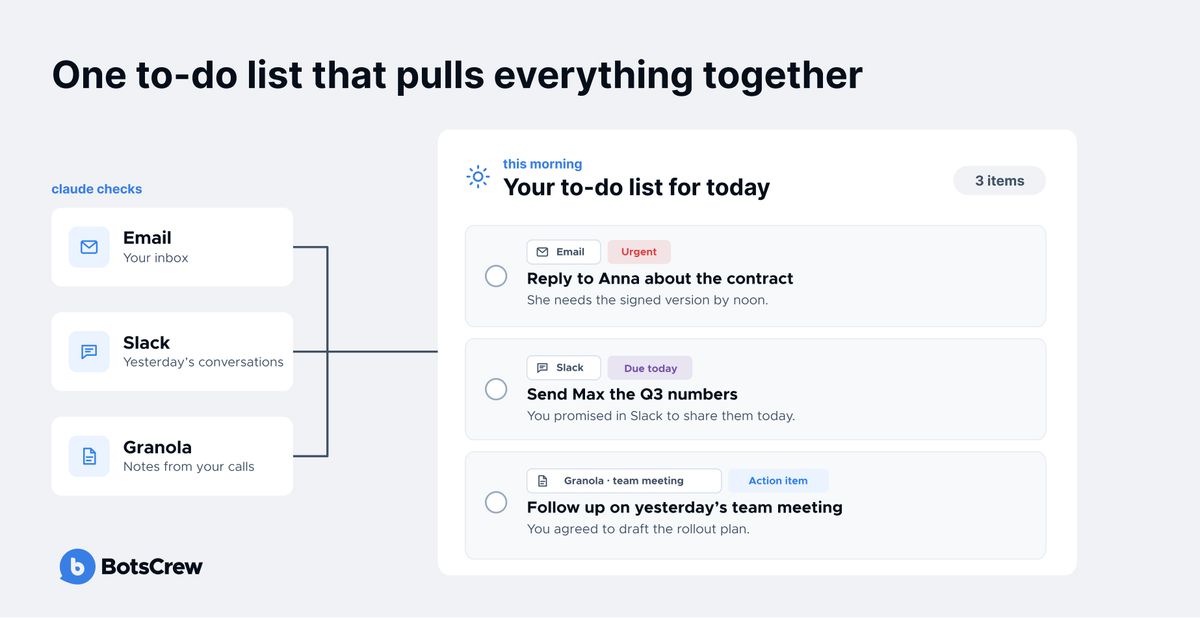
Another simple scenario is a daily email digest. It's set up as a scheduled task in Claude Cowork: every morning, Claude groups emails into categories the person defined themselves. These cover what needs a reply, what's worth passing to a colleague, and what AI industry news came in through newsletters.
The setup gets even more useful once you connect Slack and Granola. In Slack, Claude reviews yesterday's conversations to check whether anyone is still waiting for a reply and whether you promised to do something. Granola adds notes from your calls, so Claude can see the action items you agreed on. As a result, you start the day with one to-do list that pulls everything together:
How do engineers manage AI tasks without Jira?
When a technical plan has 20–40 tasks — some handled by Codex, Gemini, or Claude Sonnet, and some by a human — keeping statuses and dependencies in your head gets hard. Jira is often overkill for this scenario, and markdown notes quickly turn into chaos.
The solution is the kanban-board skill. Claude turns the plan into a single interactive HTML file with three modes: a list, a Kanban board with drag-and-drop, and a dependency graph. Each task comes with a ready-made prompt you can copy into Codex or Claude for autonomous execution. When dependencies are completed, blockers are cleared automatically.
For instance, instead of handing the agent the entire 40-task plan every time, the engineer gives it one task with its dependencies, expected result, and definition of done. Less context means fewer tokens and less chance the agent gets lost or starts solving the wrong part of the problem.
🙉 Does everything work perfectly? Here's what we've learned
AI makes a lot of work faster, but it doesn't run on autopilot. Here are a few tips that will save you time and frustration:
Explore the limitations and look for workarounds. Every tool and connector has its limits. For example, our time-logging skill can't edit or delete a worklog once it's recorded, because the connector doesn't allow it. Instead, the skill flags which entries to fix in Tempo manually. Knowing the limitations upfront helps you design a process around them rather than getting stuck.
Adapt solutions to your needs. The same workflow or skill rarely works equally well for engineers and the finance team. The logic behind a solution can be reused, but the details need to be tuned to how each team actually works.
Look for the simplest solution that works. Not every problem needs a complex setup. A scheduled task in Claude Cowork is enough for a daily to-do list, logging time in Jira calls for a skill, and link building works best with a browser extension. Choose the tool that fits the problem, and sometimes the simplest option is the right one.
Always review the output. Claude doesn't replace your review. A proposal deck may need a few tweaks or a couple of rounds, and we still proofread case studies by hand. The less context Claude gets, the more editing you'll need. And if you haven't read and checked the result, there is a good chance you are shipping AI slop. Our guide to AI hallucinations explains why unchecked output goes wrong.
*Claude-as-a-teammate breaks down in four situations: a connector doesn't allow the action you need, Claude gets too little context, nobody reviews the output, or the task is really a customer-facing product. The first three have workarounds; the fourth needs a different kind of build.
What should you do to replicate this in your team?
Start with one routine task you do every week following the same pattern: a report, a status update, a time log, an email to a client. That's where AI delivers results fastest.
Step 1. Give Claude access to your work systems
Set up connectors to the services where your context lives: your task tracker, knowledge base, messenger, call recordings, and email. Without them, Claude only has limited access to your data, so there is a lot it simply can't do. The alternative is copying and pasting information into the chat manually, which takes much more time and effort. It can also be less secure than using official MCP connectors, which give Claude controlled access to exactly the data it needs.
Step 2. Create one shared project
Not for the whole company, but for one team or one client project. Ask Claude to gather the context and write the instructions itself, then review them.
Step 3. Write down the boundaries
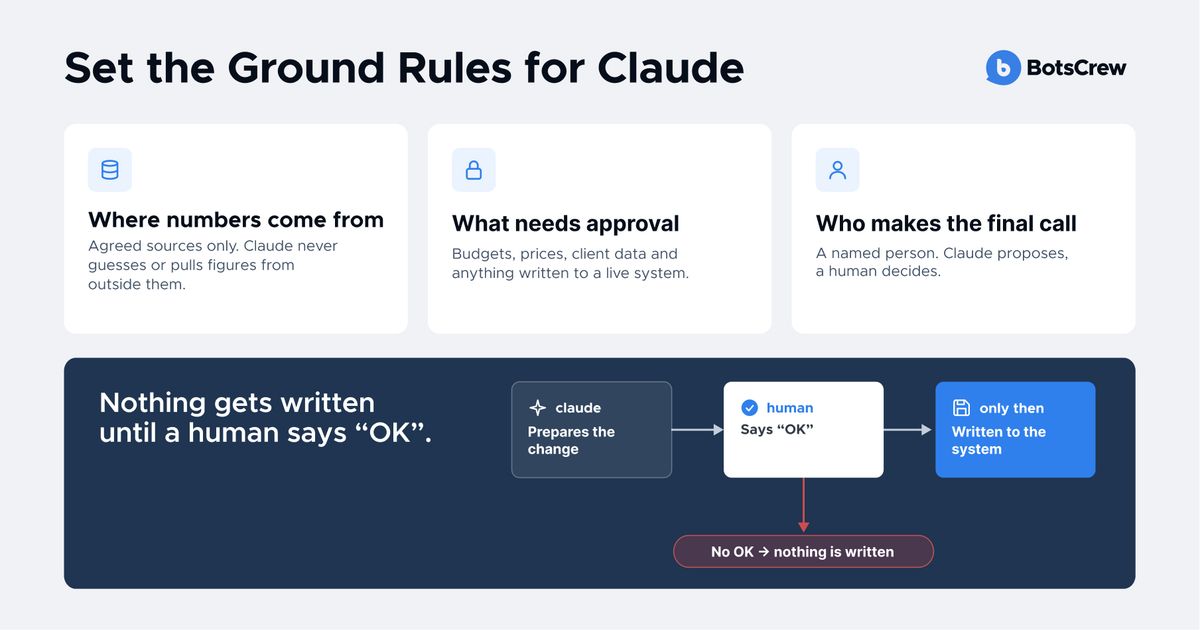
Define where Claude gets its numbers from, what it can't change without confirmation, and who makes the final decision. For example, a rule like "don't write anything until a human approves" makes the automation safer.
Step 4. Turn repeats into skills
If you've done something a second time, turn it into a skill or playbook and share it with the team. That's how a personal life hack becomes a tool for everyone.
What if you need a more complex AI solution?
Skills, projects, and connectors handle internal routine tasks well. But an AI agent that works with a live ERP or CRM, serves thousands of customers, or makes some decisions automatically is a product. It requires architecture, integrations, response validation, and data security — and therefore an experienced team for enterprise AI development.
BotsCrew is an enterprise AI consulting and implementation partner, founded in 2016, with 200+ projects delivered for clients including global brands such as Adidas, EA Sports, Samsung, and Honda, as well as non-profit organizations.
How do you choose your first Claude use case?
Pick a task that meets most of these five criteria:
- It repeats at least weekly.
- It follows the same structure each time.
- Its data already lives in systems Claude can reach through connectors.
- A mistake is cheap to catch and fix.
- One named person reviews the output.
Which Claude setup fits which job?
| Setup | Best for | BotsCrew example |
|---|---|---|
| Claude Project | Shared context and rules for one team or client | One project per client engagement |
| Skill | A repeatable output in a fixed format | Finance reporting, kanban board, time logging |
| Scheduled task in Claude Cowork | Work that should run on a timer | Morning to-do digest |
| Claude-built tool | A fix inside a tool you already use | Link-building Chrome extension |
| Custom AI product | Customer-facing work, live systems, automated decisions | BotsCrew enterprise builds |
For teams on Microsoft 365 instead of Google Workspace
BotsCrew runs on Google Workspace and Atlassian, but the approach does not depend on that stack. Teams on Microsoft 365 can follow the same steps with Claude's Microsoft 365 connector.
For regulated industries
Tighten the ground rules before connecting anything. Allow agreed data sources only, keep client data inside approved projects, and require human sign-off before anything is written to a live system. On Claude Team and Enterprise plans, only organization Owners can add custom connectors, according to Anthropic's connector guide.
FAQ
What do you need to set up Claude for a team?
You need three things: connectors to the systems where your work lives, one shared Claude Project with written instructions, and playbooks for recurring tasks. Connectors cover your task tracker, wiki, messenger, call recordings, and email. Claude can draft the project instructions itself from your existing docs and call notes; a team member then reviews them.
How long does it take to roll out Claude across teams?
At BotsCrew, each team follows a two-month plan. It starts with one shared project and 2–3 real use cases, then adds one use case a week. Anything done twice becomes a playbook, results are shown at an internal demo, and whatever works across several teams becomes a company standard.
Is it safe to connect Claude to Jira, Slack, and Gmail?
Official MCP connectors give Claude controlled access to the data it needs, which is safer than pasting information into a chat. On Team and Enterprise plans, only organization Owners can add custom connectors. Pair connectors with written rules: agreed data sources only, and nothing written to a live system until a named person approves it.
How much does the Claude Team plan cost?
The Claude Team plan, for teams of 2 to 150, costs $20 per standard seat per month billed annually ($25 billed monthly); premium seats with 5x more usage cost $100 ($125 monthly). Enterprise costs $20 per seat per month, billed annually, plus usage at API rates. Prices are from claude.com/pricing, checked October 14, 2026, and exclude tax. Beyond seats, cost depends on connector setup time and how many custom skills you build.
What's the difference between a Claude Project, a skill, and a scheduled task?
A Claude Project holds shared context and instructions for one team or client. A skill is a reusable set of instructions that produces a specific output, such as a monthly report. A scheduled task in Claude Cowork runs on a timer, such as a morning email digest. Pick the simplest one that solves the problem.
When do you need a custom AI solution instead of Claude?
You need a custom solution when an AI agent works with a live ERP or CRM, serves thousands of customers, or makes decisions automatically. At that point it is a product, not a shared project. It needs architecture, integrations, response validation, and data security, built by an enterprise AI development team.
Not sure which processes at your company are worth handing off to AI?
Tell us what you're struggling with, and the BotsCrew team will help you figure out where to start.