MCP for Enterprise (2026): Connecting Claude to Your Data
MCP is emerging as the integration layer for enterprise AI. Instead of building custom connections for every workflow, companies can use MCP to securely connect Claude to Salesforce, SAP, ServiceNow, internal systems, and company knowledge through a single standard.

💡TL;DR
- MCP for enterprise is the integration layer that lets Claude connect to Salesforce, SAP, ServiceNow, and internal data through a single, governable interface.
- MCP is becoming the default protocol for AI-to-system integration — major enterprise vendors are now publishing official MCP servers.
- MCP servers sit on top of existing APIs; they don't replace them.
- Three integration tiers: vendor-published servers, internal servers for proprietary systems, document/data servers for unstructured knowledge.
- The real value is cross-system reasoning in a single Claude conversation.
- The bottleneck is governance, not engineering.
Most enterprise AI POCs and pilots stall at the same point: the model is impressive in a demo, then quietly becomes useless the moment it has to touch a CRM record, an ERP transaction, or an ITSM ticket. The reason is not the model. It is the integration layer underneath it.
MCP for enterprise is the integration layer that fixes this. Model Context Protocol (MCP) is an open standard that lets AI models like Claude securely connect to enterprise systems — Salesforce, SAP, ServiceNow, and internal data — through a single, governable interface.
This article is for leaders evaluating where MCP fits into their AI strategy, what it actually does that custom APIs do not, and what a credible enterprise rollout looks like. It assumes you have already run a Claude prototype or two, and are now asking the harder question: how do we connect this to the systems our business actually runs on?
What's in this article:
- Why This Matters Now
- What Is an MCP Server in AI?
- MCP vs API: Why This Is Not Just Another Wrapper
- Enterprise MCP Integration: What It Looks Like in Practice
- MCP Architecture: A Simple Mental Model
- MCP Use Cases That Move the Needle
- How to Add MCP Servers to Claude (and Make It Stick)
- Frequently Asked Questions
Why This Matters Now
Enterprise AI has moved past the chatbot phase. The serious value — and the serious risk — sits in AI agents that read from and write to real business systems. Pipelines, invoices, incident tickets, supply chain records, HR data. Without access to those, an AI assistant is a smarter search box. With access, it becomes a colleague who can actually move work forward.
Two things are changing how this kind of access gets built. First, models have gotten good enough at using tools that reasoning isn’t the problem anymore. The real challenge is wiring everything together. Second, every major enterprise vendor (Salesforce, SAP, ServiceNow, Microsoft, Atlassian, Box, and dozens more) is racing to release official MCP servers. They see where this is going: MCP is quickly becoming the standard way AI models connect to business systems.
What Is an MCP Server in AI?
An MCP server is a small service that exposes a system — like Salesforce, a database, or an internal HR tool — to any MCP-compatible AI model in a format the model can call directly. Model Context Protocol, the underlying standard, was introduced by Anthropic in late 2024 and is now being adopted by major enterprise vendors as the default way models talk to systems.
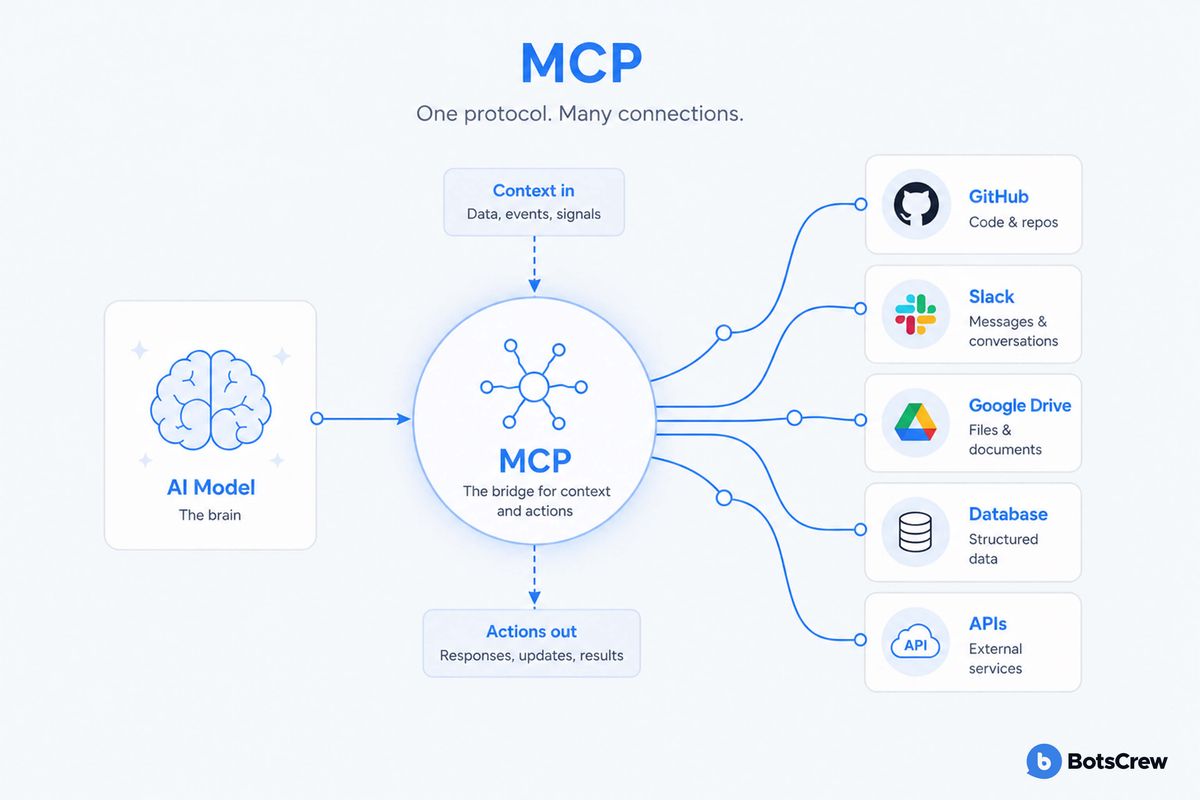
One way to picture it: MCP is basically USB-C for AI.
Before USB-C, every device needed its own cable and charger. It worked, but it didn’t scale well. MCP fixes that for AI by giving models one standard way to plug into different systems.
For an executive, three things are worth internalising:
- A model like Claude does not need to be retrained or fine-tuned to use an MCP server. The server simply advertises what it can do, and the model figures out when to call it.
- The same MCP server can be used by Claude, by Claude Code, by an agent in your custom application, or by a desktop assistant — without rewriting the integration each time.
- Permissions, authentication, and audit logging live at the MCP server layer, which means your security team gets a single place to govern AI access to a system, rather than chasing it across every workflow.
Prefer a visual walkthrough? This short explainer covers how MCP works, why it matters for enterprise AI integration, and what it looks like in practice.
MCP vs API: Why This Is Not Just Another Wrapper
The short answer: a traditional API is built for developers; an MCP server is built for AI models. APIs expose fixed endpoints and expect you to follow strict schemas. MCP servers, on the other hand, describe what they can do in a way models can understand and figure out on the fly. Both still work together — most MCP servers are just a smarter layer on top of existing APIs.
Both coexist — most MCP servers are built on top of existing APIs. The difference is who they're built for.
| Dimension | Traditional API | MCP Server |
|---|---|---|
| Built for | Developers writing integration code | AI models discovering tools at runtime |
| Schema discovery | Static, documented externally | Self-describing at runtime |
| Adding a new use case | Often a new wrapper per integration | Additive — reuses the existing connection |
| Governance & audit | Spread across each integration | Centralised at the MCP server layer |
| AI client portability | Locked to one agent framework | Works across Claude, Claude Code, custom apps |
| Best fit for | System-to-system integration | AI agent → enterprise system |
Source: BotsCrew · MCP for Enterprise
Executives who have been through previous integration waves are right to be skeptical. Isn't this just an API with a new name? The MCP vs API distinction is worth getting right, because it changes how you should plan the work.
A traditional API is built for developers. It exposes endpoints, expects exact parameter formats, and assumes the caller already knows what they want. If the model gets the schema slightly wrong, the call fails. Every new use case usually means a new wrapper, new error handling, and new prompt engineering to coax the model through it.
An MCP server is built for models. It exposes capabilities with self-describing metadata, type definitions, and natural-language descriptions of what each tool does, when to use it, and what to expect back. The model reads that catalogue at runtime and selects the right tool the same way a new employee would scan an internal wiki.
The practical implications for an enterprise are significant. Onboarding a new use case becomes additive rather than rebuilt — once Salesforce is exposed via MCP, every future Claude-powered workflow that touches Salesforce uses the same connection. Governance becomes more centralised, and your AI investments are no longer confined to a single vendor’s ecosystem.
This does not make APIs obsolete. MCP servers are typically built on top of existing APIs. The protocol is not replacing your integration layer; it is putting an AI-native interface on top of it.
Enterprise MCP Integration: What It Looks Like in Practice
The most useful way to think about enterprise MCP integration is in three tiers, mapped to where your data and systems already live.
Tier 1: Vendor-published MCP servers
Salesforce, ServiceNow, SAP, Microsoft, Atlassian, GitHub, Slack, Box, HubSpot, and a growing list of vendors now publish official MCP servers. These come with vendor-supported authentication, scoped permissions, and the operational guarantees you would expect from any sanctioned integration.
For most leaders, this tier is often the fastest path to value. A handful of business-critical use cases — pipeline analysis in Salesforce, ticket triage in ServiceNow, financial summaries from SAP — can be unlocked in weeks, not quarters, by adopting vendor-blessed MCP servers and connecting Claude to them.
Tier 2: Internal MCP servers for proprietary systems
The systems that actually differentiate your business (the in-house pricing engine, the legacy mainframe, the data warehouse with twelve years of customer history) will not have a vendor-built server. This is where you build your own.
How to build an MCP server in this context is familiar ground for any team that has built internal APIs before. The protocol is open, SDKs exist for Python, TypeScript, and several other languages, and the design pattern is straightforward: define the tools you want to expose, describe them clearly, wrap your existing service calls, and add the auth and audit layer your security team requires.
The strategic question isn’t ‘can we build one?’ It is which systems deserve to be exposed to AI agents in the first place, and what are the guardrails?
Tier 3: Data and document servers
Beyond live systems, most enterprises have unstructured knowledge — policies, contracts, runbooks, past proposals — that AI agents need to reason over. MCP servers fronting Confluence, SharePoint, S3 buckets, or vector stores let Claude pull the right document at the right moment without you having to bake it into a fine-tune or a static RAG pipeline.
This tier is often underweighted in early planning and overdelivers in production. The combination of "act on the system" plus "reason over the documents that govern the system" is what makes an AI agent feel competent rather than novel.
MCP Architecture: A Simple Mental Model
A clean MCP architecture for an enterprise has four layers, and it is worth sketching them on a whiteboard with your CIO before any procurement conversation.
In simple terms, it works like this: the user talks to an AI assistant, the assistant connects to MCP servers, and those servers act as controlled gateways into your business systems.
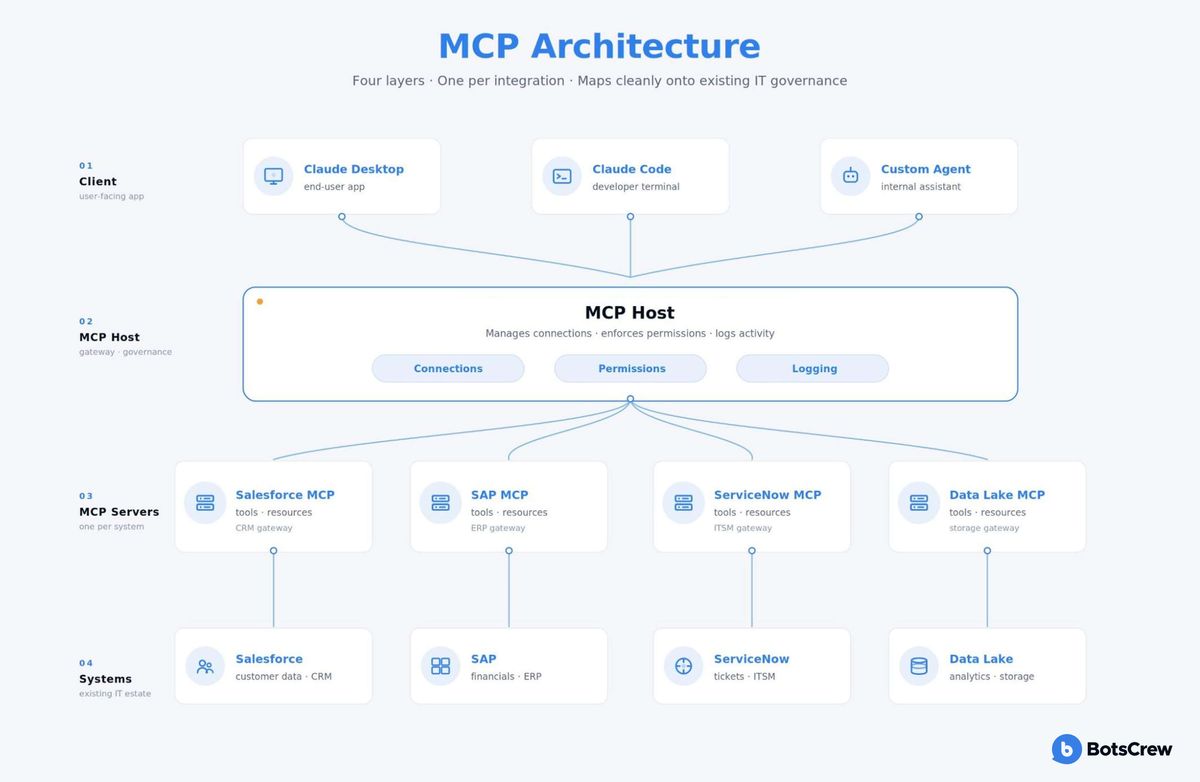
The client is whatever the user interacts with — Claude in a desktop app, Claude Code in a developer's terminal, a custom Claude-powered agent in your own product, or an internal assistant.
The MCP host manages connections between the client and MCP servers, handles permissioning, and logs activity.
The MCP servers are the individual integrations — one per system, each exposing a specific set of tools and resources.
The underlying systems are your existing tools — Salesforce, SAP, ServiceNow, data lakes, file storage, and internal apps.
The architecture is deliberately boring, and that is its strength. It maps cleanly onto how IT already thinks about integration, security, and governance — which means you can take it through architecture review, security review, and procurement using the same processes you already trust.
MCP Use Cases That Move the Needle
Three patterns of MCP use cases show up consistently in enterprise rollouts that have generated meaningful ROI.
The first is cross-system reasoning. A sales leader asks Claude, "Which deals slipped this quarter, why, and what does Finance think the revenue impact is?" Claude pulls from Salesforce, cross-references the company's forecasting model, and references the latest call transcripts in your knowledge base — all through MCP servers, in a single conversation. No human stitched those four systems together for that one question. The agent did, on demand.
The second is operational acceleration. ServiceNow tickets get triaged, enriched with the relevant runbook, and routed in seconds rather than minutes. Procurement requests get pre-validated against SAP master data. Customer support drafts get composed with the right account context already pulled in.
The third is internal developer productivity. Engineering teams add MCP servers to Claude Code so the model can see their staging databases, log aggregators, and internal APIs while writing or reviewing code. The productivity uplift here is the easiest to measure and the easiest to justify in a budget conversation.
In every case, the pattern is the same: the value comes from the systems being connected, not from the model alone.
How to Add MCP Servers to Claude (and Make It Stick)
At a basic level, adding an MCP server to Claude Code is straightforward.
You install or build the server, register it in the MCP configuration, restart the client, and confirm the new tools appear. Vendor-published servers (like Salesforce or ServiceNow) usually come with prebuilt configs, while internal servers are registered the same way once they’re running.
That part is easy.
What actually determines success is everything around it.
Which systems do you connect first — and why? Who gets access to what? How are permissions managed as new use cases appear? How do you track and audit what the AI is doing across systems?
Without clear answers, MCP setups tend to sprawl. Teams spin up their own servers, integrations get duplicated, and governance becomes fragmented.
The organisations that get real value from MCP treat it like an integration layer, not a feature. They define ownership early, standardise how servers are registered, and plug audit logs into existing security workflows.
In other words: adding an MCP server is a technical step. Making it stick is an organisational one.
Frequently Asked Questions
If your organisation is already running Claude prototypes, custom skills, or early agents — and is now asking how to connect them to Salesforce, SAP, ServiceNow, or proprietary internal systems — you are exactly at the inflection point where MCP architecture decisions start to compound. Getting the first three or four MCP integrations right tends to set the pattern for the next thirty.
This is the work BotsCrew does for enterprise teams every day. Our certified Claude developers help leaders move from prototype to production: auditing what you have already built, designing the MCP architecture that fits your security and governance posture, building the internal MCP servers your differentiated systems require, and standing up the operational practices that keep an AI programme healthy as it scales.
If you have a Claude prototype, a set of custom skills, or an early agent that needs to reach further into your business systems, the next step is a focused conversation about your current architecture and where MCP fits. We are happy to be the people you sketch it out with.
Frequently Asked Questions
- What is an MCP server?
An MCP server is a small service that exposes an enterprise system — such as Salesforce, SAP, ServiceNow, a database, or an internal application — to any MCP-compatible AI model. It advertises the actions and data the model is allowed to use, and handles authentication, permissions, and audit logging in one place.
- How is MCP different from an API?
An API is built for developers and exposes static endpoints. An MCP server is built for AI models and exposes self-describing capabilities that the model reads at runtime. MCP servers are typically built on top of existing APIs — the protocol adds an AI-native interface, it doesn't replace the integration layer.
- Is MCP secure for enterprise use?
MCP centralises authentication, permissioning, and audit logging at the server layer, which gives security and compliance teams a single place to govern AI access to a system. Vendor-published servers from Salesforce, ServiceNow, SAP, and others come with the same scoped permissions and OAuth patterns enterprises already use. The main governance work is deciding which systems to expose, to which users, with what audit trail.
- How do I add an MCP server to Claude Code?
Install or build the server, register it in Claude Code's mcp configuration with its connection details and credentials, restart the client to discover the tools, and confirm the new tools appear in Claude's tool list. Vendor-published servers come with prebuilt configurations.
- How do I build an MCP server for an internal system?
Use one of the official MCP SDKs (Python, TypeScript, and others), define the tools you want to expose with clear natural-language descriptions, wrap your existing service calls, and add the authentication and audit layer your security team requires. The protocol is open and the design pattern is similar to building an internal API.
- Which enterprise systems already have official MCP servers?
Vendor-published servers exist for Salesforce, SAP, ServiceNow, Microsoft, Atlassian, GitHub, Slack, Box, HubSpot, and a growing list. The MCP ecosystem is expanding quickly as vendors recognise the protocol is becoming the default AI integration standard.
- What are the most common enterprise MCP use cases?
Cross-system reasoning (a single Claude conversation that touches CRM, ERP, and knowledge base), operational acceleration (ticket triage, procurement validation, support drafting), and internal developer productivity (Claude Code with access to staging databases and internal APIs).
Partner with BotsCrew to build AI that is fair, transparent, and aligned with your company's values.
Contact us