Driving AI Adoption: 5 Reasons Why Employees Don't Use the AI Tools
You bought the licenses, ran the kickoff, and usage still isn't moving? That's because employees don't adopt tools. Learn how to fix it.

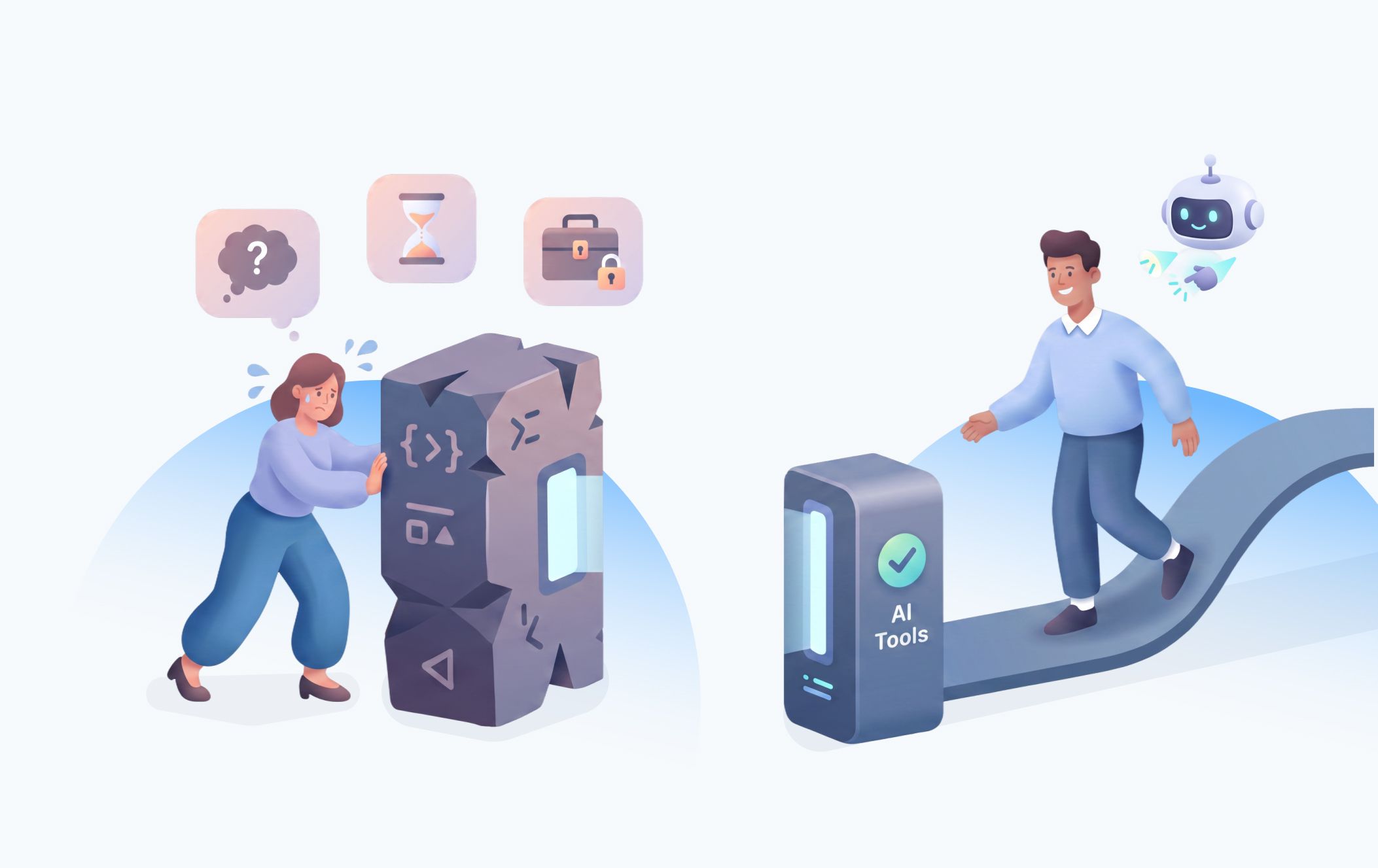
The number that should worry every executive who signed off on an AI budget this year: 90% of workers say they've used AI at work, yet three in four regularly abandon it mid-task — most often because the output didn't hold up. Nearly half say their employer doesn't pay for any AI tools at all, which means a huge share of "adoption" is actually shadow IT: people quietly running ChatGPT in a personal tab because the sanctioned tool didn't fit the job.
This is the uncomfortable truth behind most AI adoption challenges: the technology usually works but the rollout doesn't. And the gap between "we deployed AI" and "our people actually run their work through it" is where most of the ROI you promised the board quietly evaporates.
This article breaks down the six most common reasons employees stop using AI tools that were deployed for them, and the concrete fixes for each — the same diagnostic we walk enterprise teams through as part of an enterprise AI strategy engagement.
Reason 1: Employees Don't Know What "Use AI" Means for Their Specific Job
A platform launches, executives send the memo, IT provisions the licenses, a training webinar goes up on the intranet, and then — nothing much changes?
That means the employees genuinely don't know what "use AI" translates to when they sit down to do their actual job. This is one of the most common AI adoption barriers we see, and it explains why generic rollouts underperform even when the underlying model is excellent. A sales rep, a claims adjuster, and a supply chain planner don't need "access to AI". Instead, they need three or four specific prompts or workflows that solve problems they already recognize as annoying.
In 30 minutes, we'll help you pinpoint the real bottleneck and what to do about it first.
Schedule a Free 30-Minute CallHow to Fix It:
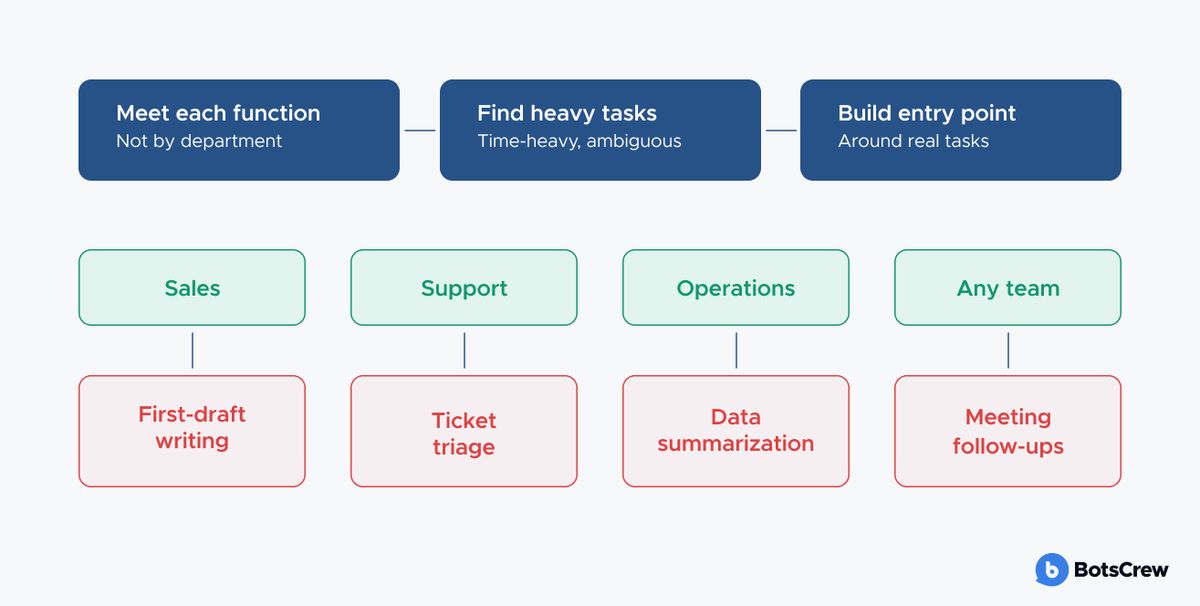
✅ Map use cases by role. Sit with each function and identify the two or three tasks that eat the most time and tolerate the most ambiguity — first-draft writing, data summarization, ticket triage, meeting follow-ups, or something else. Build the AI entry point around those, not around the technology's general capability.
✅ Give people a starting point. Most people won't experiment their way to something useful, they'll try it once, get a mediocre result, and quit. Give each role a small library of pre-written prompts tied to their actual workflows: the exact wording a claims adjuster would paste in to summarize a file, the template a sales rep would use to draft a follow-up email, the format a planner would use to flag supply anomalies. Let people edit and riff from there once they see it work once.
✅ Make the win visible in week one. Sequence the rollout so the earliest use cases are the highest-confidence ones. Don't lead with the hardest problem in the department — lead with the one most likely to work on the first try. Concretely, that means:
— Pick a task with a short feedback loop. Something the person can try, see the output, and judge for themselves within minutes — not a workflow where the payoff only shows up at the end of a multi-week process.
— Pick a task where "good enough" is genuinely good enough. Early wins should be tasks where an 80%-there draft still saves real time (a first-pass email, a meeting summary, a rough data pull) — not tasks where anything short of perfect creates rework or risk.
— Let the team self-report the win, don't just announce it. A message from a manager saying "the tool is great" carries far less weight than a peer saying "this saved me twenty minutes on the thing I hate doing every Monday." Build in a lightweight way for early users to share what worked — a Slack channel, a one-line survey, a five-minute team huddle — so the proof of value comes from inside the team.
— Publicize the specific win, not the general capability. "Our team is now using AI" doesn't stick. "Maria cut her weekly report prep from 90 minutes to 20" does. Specificity is what makes the next person think "I have that same problem."
Reason 2: The Tool Lives Outside Their Actual Workflow
Even a technically excellent AI tool gets abandoned if using it means leaving the system where the work already happens. If an employee has to tab out of their CRM, open a separate chat window, copy in context by hand, and paste the answer back — that's five extra steps standing between them and a task they could've just done manually in the first place. Most employees will quietly revert to their default habit rather than fight a tool that adds steps instead of removing them.
It's one of the clearest AI adoption challenges at scale: the tools that get used are the ones that show up inside existing systems of record — the helpdesk, the CRM, the inbox, the document review queue — not the ones that ask employees to change where they work in order to get help with the work.
How to Fix It:
✅ Embed the AI layer into the tools people already live in. This is the practical difference between a chatbot experiment and an agentic AI system: agents connected via protocols like MCP can read from and write to your CRM, ERP, or ticketing system directly, so the employee never has to leave their normal screen to get AI-assisted work done.
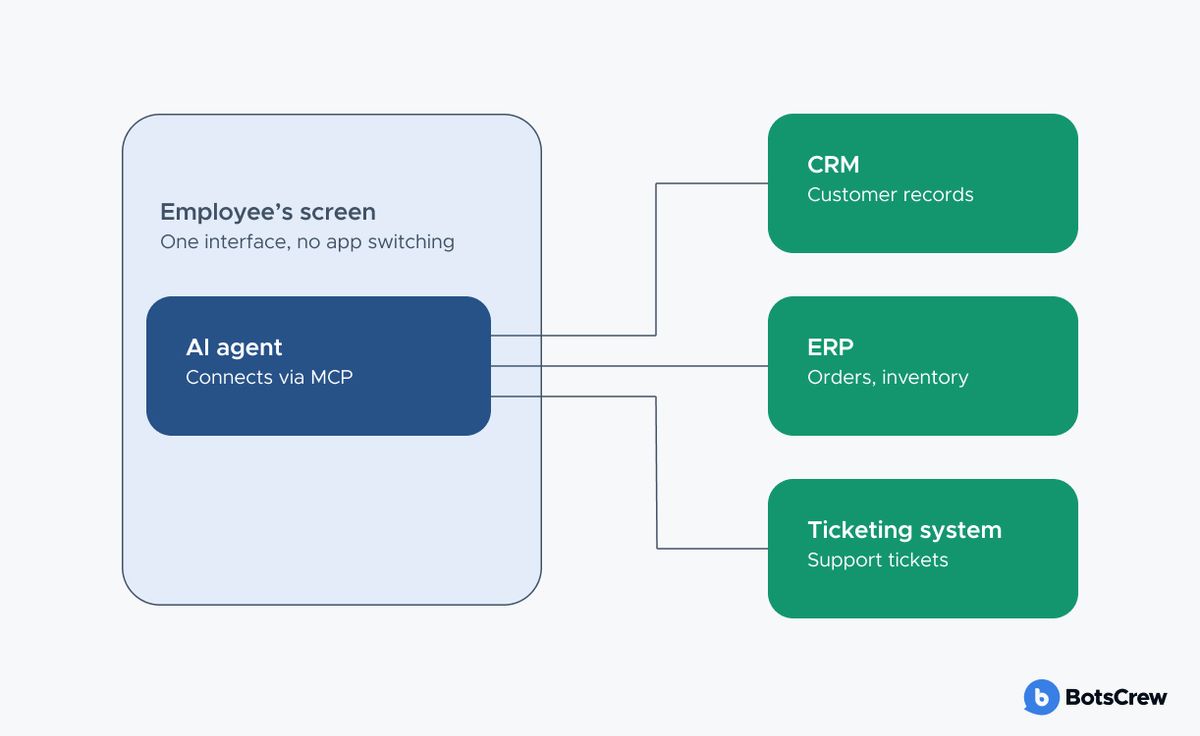
✅ Reduce the "context tax" to zero. Every time an employee has to explain who the customer is, what the ticket is about, or what's already happened in a thread before the AI can help, you've reintroduced the exact friction embedding was supposed to remove. A well-integrated agent should already have the record pulled up, the history loaded, and the relevant fields visible — the employee's first action should be reviewing or approving output, not assembling the input.
Reason 3: They Don't Trust the Output
People often technically "use" the tool while quietly not trusting what it gives them, which shows up later as low-quality output, rework, or outright abandonment. Furthermore, nearly half of workers say they don't trust a colleague's output once they know AI was involved in producing it — which means the trust problem isn't just employee-to-tool, it's employee-to-employee, and it needs to be addressed at the culture level, not just the product level.
How to Fix It:
✅ Build an evaluation layer employees can see. A visible confidence score, a source citation, or a "here's what this is based on" trail does more for trust than a polished UI ever will. This is a core part of any serious LLM evaluation practice — and it needs to be legible to end users, not just to the people who built the system.
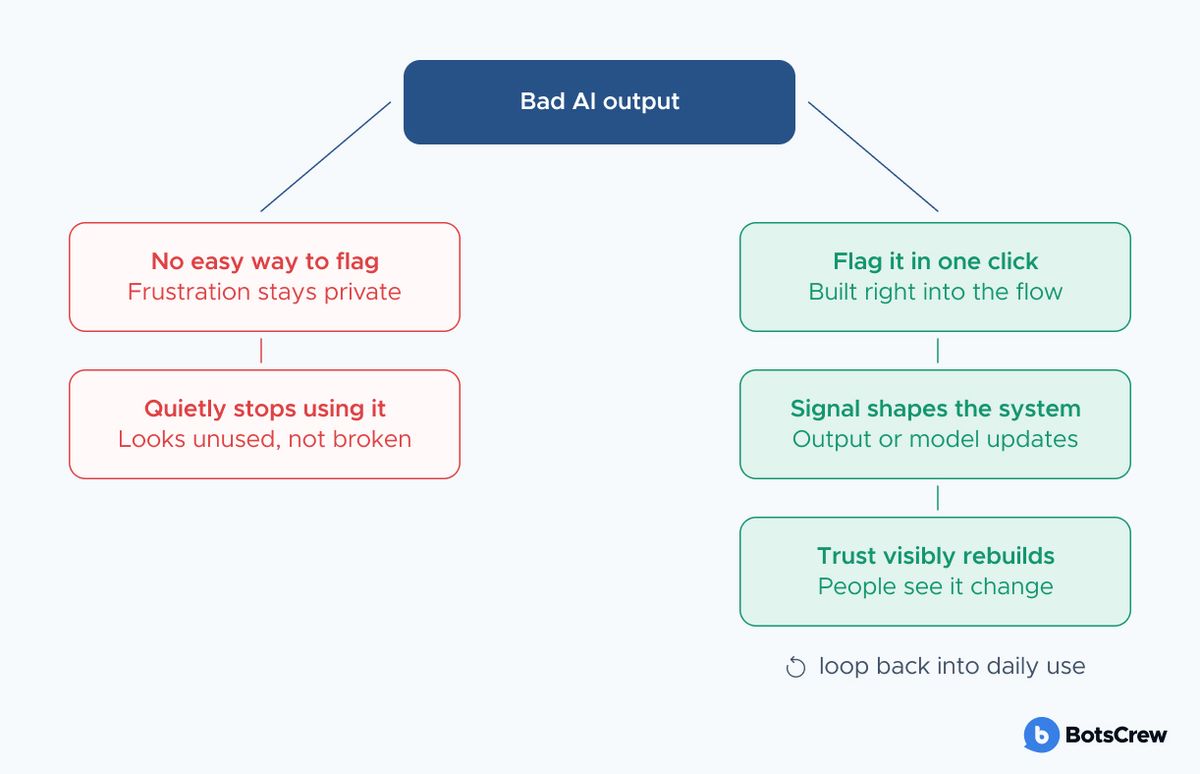
✅ Give your employees a fast, frictionless way to flag a bad output. Without a feedback loop, every bad answer becomes a private reason to quit using the tool instead of a data point that improves it. Feedback loops don't just improve the model — they visibly demonstrate to employees that their signal changes the system's behavior, which is what actually rebuilds trust.
✅ Set explicit standards for what "reviewed" means. Define what review looks like for different types of output (a first-draft email vs. a client-facing report vs. a financial summary) so a disclosure tag comes with an implicit, agreed-upon quality bar attached to it.
✅ Let people see the tool be wrong in a low-stakes setting first. Counterintuitively, trust often builds faster when employees watch an AI tool make a visible, low-cost mistake — and see it corrected — than when it appears flawless from day one.
BotsCrew runs a short diagnostic to pinpoint which root cause is in play on your team — before you spend another dollar on tools or training.
Book a Free Diagnostic CallReason 4: Training Was a Webinar, Not a Skill
Workers often report receiving no meaningful skills development despite a wave of AI rollouts around them. Specialists who built deep expertise over years suddenly feel like novices again in front of a new tool, with no structured path to rebuild that confidence.
How to Fix It:
✅ Build a champions network inside each team. Peer-to-peer support — a colleague who's two weeks ahead and can show a real example — consistently drives adoption further than top-down training, because it removes the fear of asking a "dumb question" in front of the whole team.
✅ Make training continuous, not a one-time event. AI tools change fast, and a single launch-week session goes stale within a quarter. Short, recurring touchpoints tied to real use cases outperform a big kickoff every time — this is the same operating discipline that separates companies stuck piloting AI from the ones running it at scale.
Reason 5: They're Afraid AI Will Replace Them
This fear rarely gets said out loud in a meeting, but here's the thing: if an employee quietly believes that getting good at the tool means making their role easier to eliminate, no amount of prompt libraries or embedded workflows will fix the underlying incentive problem. They'll use AI just enough to avoid looking like they're falling behind, and no more — because using it well, visibly, and often feels like handing management the evidence they need to justify a smaller team.
How to Fix It:
✅ Have leadership say explicitly that using AI is a sign of skill, not a substitute for it. Frame it in terms people can act on: knowing which tasks to hand off, how to prompt effectively, and how to judge and correct the output is itself a professional skill worth developing — not a shortcut around one. Say this in performance conversations, not just in an all-hands slide, since that's where the message actually gets tested against what people believe about their own job security.
✅ Show what happens to the time AI saves. Reinvest saved time visibly: fewer overtime hours, room for higher-value work, or an explicit statement that headcount plans aren't tied to individual tool usage.
✅ Normalize AI use publicly, starting with senior specialists. When leaders visibly use AI in their work and talk about it plainly, it lowers the perceived risk for everyone below them. Silence from the top reads as ambiguity, and ambiguity defaults to caution.
✅ Separate individual performance metrics from tool-usage metrics. If "AI adoption rate" becomes a line on someone's review, or if the fastest adopters are quietly the first ones reassigned or let go, employees will notice the pattern faster than any policy memo can counteract it. Measure team-level outcomes — throughput, quality, turnaround time — rather than tracking and ranking individuals by how much they used the tool.
The Framework: Diagnose Before You Fix
Not every team is stuck for the same reason, and applying the wrong fix wastes a rollout cycle you don't get back. Before investing further, diagnose where the actual friction sits.
| # | Symptom you're seeing | Likely root cause | Where to start |
|---|---|---|---|
| 1 | High curiosity, low repeat usage | No clear use-case mapping Reason 1 |
Role-based use case workshops |
| 2 | People say it's "extra work" | Tool sits outside the workflow Reason 2 |
Embed AI into existing systems |
| 3 | Usage up, quality/confidence down | Trust deficit Reason 3 |
Visible evaluation + shadow mode |
| 4 | Early enthusiasm, fast drop-off | Training theater, not skill-building Reason 4 |
Role-specific, recurring training |
| 5 | Quiet non-use, no complaints | Fear of judgment or job risk Reason 5 |
Leadership framing + reinvestment story |
| 6 | Unapproved tools spreading | No governance or unclear policy Reason 6 |
Publish AI usage policy, define approved use cases |
What This Looks Like in an Enterprise AI Strategy
An enterprise AI strategy has to answer all six of these before a single license gets provisioned company-wide:
- Which specific tasks, by role, will this tool touch first?
- Where does it live — inside existing workflows, or as a separate destination?
- How will employees verify an output is trustworthy before they act on it?
- Who trains people, on what cadence, tied to which real tasks?
- What does leadership say — and do — about time saved?
- What's explicitly allowed, explicitly not, and who owns that policy?
AI Adoption: Frequently Asked Questions (FAQ)
- Why don't employees use the AI tools companies deploy?
The most common reasons are: unclear use cases for their specific role, tools that sit outside their daily workflow, low trust in the accuracy of outputs, one-time training instead of ongoing skill-building, and fear of losing the job because AI will simply automate it.
- How do you create an AI adoption strategy that actually works?
Start with role-based use case mapping instead of a blanket rollout, embed AI into the systems employees already use, build visible evaluation and feedback loops to establish trust, and publish clear governance before broad deployment. Treat these as one connected system, not a sequence of separate initiatives.
- What's the difference between AI adoption and AI transformation?
Adoption measures whether people use a tool. Transformation measures whether the organization's workflows, incentives, and governance are redesigned around AI as the default way work gets done.
Struggling to Get Your Teams to Actually Use the AI You've Deployed?
BotsCrew works with enterprise and mid-market teams on the part most vendors skip: making AI part of how people actually work, not a tool that sits unused next to it.
If your adoption numbers aren't moving, a short diagnostic call is usually enough to identify which of the five reasons is actually in play.
Schedule a Free Strategy Call