Connecting On-Premise ERP to AI: Architecture, Security, and What to Expect
Most manufacturers already use AI with their ERP data, usually by manually uploading CSVs — slow and quietly risky. This guide explains how to replace that workaround with a secure, read-only MCP connector: the architecture, the security model, and what to expect.


💡In short: The safest way to connect an on-premise ERP like Epicor, SAP or Infor to AI is a read-only MCP connector, not manual CSV uploads. The connector exposes only the data a use case needs, masks sensitive fields before anything leaves the network, and creates a single auditable path that keeps AI use compliant by design. Start with one narrow use case to prove value, then expand on the same foundation.
Most manufacturers are already using AI. They're just doing it in a way that quietly creates risk.
Walk into a mid-market manufacturing company today and you'll likely find the same quiet workaround happening across finance, operations, and sales teams: someone exports a report from the ERP as a CSV, uploads it into an AI assistant, and asks it to summarize order status, flag anomalies, or draft a customer update. It works. It saves time. And it exposes the business to a set of risks that no one signed off on.
The manual upload has become the default bridge between enterprise data and enterprise AI. It's also a liability — inefficient, uncontrolled, and increasingly out of step with the internal AI policies that IT leaders are now writing.
The pressure comes from two directions at once. AI has become genuinely useful for the day-to-day work that surrounds an ERP — reporting, exception monitoring, forecasting, and answering the "what's the status of X?" questions that consume operational hours. At the same time, governance has caught up: legal, security, and compliance teams are defining what data can leave the building and how AI tools may be used with proprietary or customer information. For manufacturers running on-premise ERP systems (Epicor, SAP, Infor, and others) this creates a specific tension. The system of record lives inside the firewall for good reasons: data sovereignty, latency, integration with shop-floor systems. Yet the AI value sits in the cloud, and the manual CSV upload is what happens when employees try to close that gap on their own.
The better path is a direct, secure, read-only connection between your ERP and your AI layer. It gives employees the capability they already want while giving IT the control it needs, and the question is no longer whether to connect ERP and AI, but how to do it without creating a new attack surface. This article explains what that on-premise ERP AI integration actually looks like: the architecture, the security model, and what leaders should realistically expect from a first build.
Table of Contents
- The Problem With the Manual Workflow
- How Does an On-Premise ERP-to-AI Connector Work?
- Should You Connect Your Whole ERP at Once?
- What Can AI Do Once It's Connected to Your ERP?
- Manual Uploads vs. a Read-Only Connector
- Key Takeaways
- Frequently Asked Questions
The Problem With the Manual Workflow
It's worth being precise about why the CSV-upload habit is a problem, because each issue maps to a design requirement for the real solution.
Inefficiency. Every report is a repeated manual sequence: log in, run the query, export, upload, prompt, review. Consider a single recurring report that takes 15 minutes to pull manually, run twice a week across five people — that alone burns roughly 130 hours a year in skilled time producing no durable asset. (Illustrative, but representative of what these workflows actually cost.)
Security exposure. When individuals decide what data to upload, there is no central control over what proprietary or sensitive information enters a third-party cloud environment. There's no audit trail, no scoping, and no way to guarantee that a spreadsheet doesn't contain more than it should.
Compliance risk. Most organizations now have — or are drafting — an internal AI policy. Ad hoc uploads almost always violate the spirit of that policy even when they don't break an explicit rule yet. That gap between practice and policy is exactly what an audit or incident will expose. (For a broader look at controlling AI behavior at the enterprise level, see our guide to enterprise AI guardrails and safety techniques.)
A good on-premise ERP AI integration answers all three: it eliminates the manual steps, it centralizes control over what data is exposed, and it makes the whole flow policy-compliant by design rather than by hope.
How Does an On-Premise ERP-to-AI Connector Work?
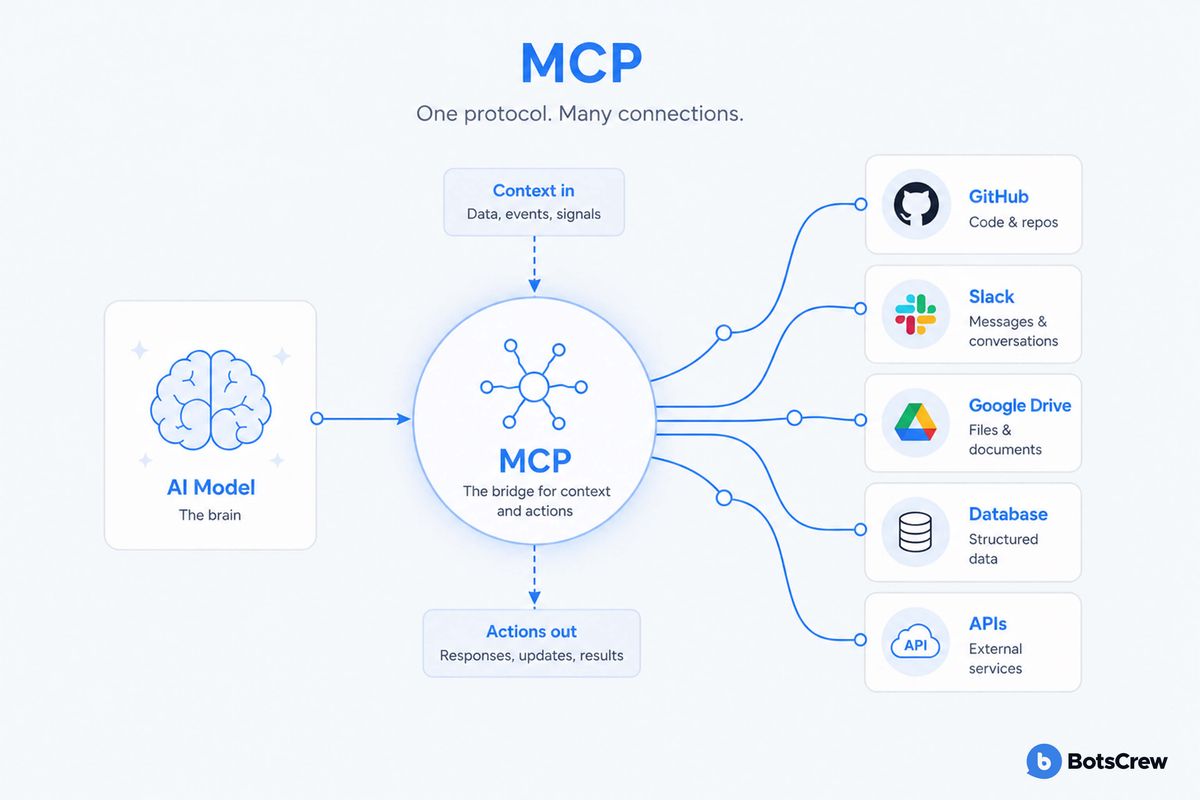
The cleanest way to connect an on-premise ERP to a modern AI assistant is through a connector built on the Model Context Protocol (MCP) — an open standard, introduced by Anthropic on November 25, 2024, that lets AI systems securely access external data sources and tools. Since launch it has been adopted across the industry, including by OpenAI, Google, and Microsoft, and is now governed under the Linux Foundation — making it a stable foundation to build on rather than a proprietary bet.
💡 What is an MCP connector? It's a controlled bridge between an AI assistant and a data source like your ERP. The AI requests specific information, and the connector decides what it's allowed to return — nothing more.
For a deeper technical walkthrough of the pattern, see our guide to MCP for enterprise: connecting Claude to your data.
Three architectural principles matter most for manufacturers.
1. Read-Only by Default
The first version of a connector should almost always be read-only. The AI can query the ERP — order status, inventory levels, production schedules, but it cannot write back, modify records, or trigger transactions. This single constraint removes an entire category of risk. It means the connector can be trusted with real data without the possibility of it corrupting the system of record, and it dramatically simplifies security review. Write access, where it's ever needed, comes later and deliberately.
2. Scoped Access, Not Open Access
An MCP connector should expose only the specific data and functions a use case requires, not the whole ERP. If the goal is order-status reporting, the connector surfaces order data and nothing else. This scoping is what replaces the uncontrolled CSV upload with governed access: IT defines exactly what the AI can see, and that definition is enforced at the connector level rather than left to individual judgment.
3. Data Stays Where It Belongs
Because the connector sits between your on-premise environment and the AI, you control the flow. Sensitive fields can be filtered or masked before anything leaves the network. There's a single, observable path for data movement, which means there's finally something to audit, log, and govern. That's the difference between "we think our AI use is compliant" and "we can demonstrate it."
The result is an architecture that gives you the cloud AI experience your teams want, layered on top of the on-premise ERP your business relies on with a controlled seam in between.
See it in action. In this short walkthrough, our team shows how Claude connects to an on-premises ERP like SAP or Epicor via a read-only MCP connector, so teams can get answers from live ERP data without exporting or uploading a single CSV.
Should You Connect Your Whole ERP at Once?
Probably not. The instinct with an integration project is to connect everything at once. However, the more ERP functionality a connector touches, the more it costs to build, secure, and maintain, and the longer it takes to deliver any value at all.
The smarter approach is a V1 connector focused on a single, high-value use case. Order status is a common starting point: it's a frequent question, it's easy to scope, and automating it produces immediate, measurable time savings. A tightly scoped first build does three things:
- Manages cost. Scope is the primary cost driver in any ERP-AI project. A narrow V1 keeps the initial investment small and predictable.
- Builds trust. A working connector in production — proven secure, proven useful — makes the case for expansion far better than any proposal document.
- Creates a foundation. The architecture and security review done for V1 become the template for every use case that follows. Expansion gets faster and cheaper once the pattern exists.
This is why phased delivery, typically starting with a fixed-price V1 and moving to an ongoing retainer as scope grows, tends to work better than a single large program. You prove value, then scale it — the same prototype-to-production path that separates AI pilots that stall from the ones that make it into daily operations.
We help manufacturers identify the single highest-value, lowest-risk connector to build first.
Book a scoping callWhat Can AI Do Once It's Connected to Your ERP?
The immediate return on a connector is straightforward: the time and cost saved by automating a manual reporting process, measured against the one-time build. For most first use cases, that direct AI ROI alone justifies the project.
But the more durable value shows up over the following months, as the connection matures from a reporting tool into an operational advantage:
- Proactive alerts. Instead of waiting for someone to run a report, the AI can monitor ERP data continuously and surface anomalies — a delayed order, an inventory shortfall, an unusual pattern — the moment they appear.
- Predictive insight. With consistent access to historical and live data, AI can begin to identify patterns and anticipate events, such as seasonal order spikes or supply constraints, before they hit.
- Continuous improvement. Unlike a human analyst, an AI layer applies constant, unlimited attention to the data, steadily finding signals and process improvements that would otherwise go unnoticed.
The connector, in other words, isn't just a faster way to do today's reporting. It's the infrastructure that lets AI move from a novelty employees sneak in through spreadsheets to a governed capability embedded in how the business runs. (For manufacturers extending AI toward customers as well as internal teams, it's worth reviewing the customer-facing AI mistakes manufacturers make before you scale.)
Manual Uploads vs. a Read-Only Connector
The contrast between the current workaround and a governed connector is stark across every dimension that matters to IT and operations:
| Dimension | Manual CSV Upload | Read-Only MCP Connector |
|---|---|---|
| Effort | Repeated manual export, upload, prompt for every report | Automated; the AI queries data on demand |
| Data control | Each user decides what enters the cloud | IT scopes exactly what the AI can access |
| Security | No central control; entire spreadsheets exposed | Sensitive fields filtered or masked before leaving the network |
| Auditability | No trail of what data was shared or when | Single, observable, loggable path for every request |
| Compliance | Violates the spirit of most internal AI policies | Compliant by design, enforced at the connector |
| Write risk | N/A (but data can be over-shared) | None — read-only cannot modify the system of record |
Key Takeaways
- Manual CSV uploads from ERP to AI are common, but they create inefficiency, security exposure, and compliance risk that no one has formally approved.
- A read-only MCP connector gives teams the AI capability they want while giving IT centralized control over what data is exposed.
- Design around three principles: read-only by default, scoped access rather than open access, and data governance enforced at the connector.
- Start with a single high-value use case (order status is a strong candidate) to manage cost, prove value, and build a reusable foundation.
- The direct ROI is automated reporting; the lasting value is proactive alerts, predictive insight, and continuous process improvement.
Moving From Workaround to Architecture
The manual upload was never a strategy. It was a symptom - evidence that your teams see the value of AI faster than your systems have been able to deliver it safely. The organizations that pull ahead will be the ones that treat that gap as an architecture problem and close it deliberately, with a secure, governed connection between their system of record and their AI layer.
If your teams are already uploading ERP data into AI tools by hand, the most useful next step is to pick one high-value use case and scope a read-only connector around it. BotsCrew has Claude-certified engineers with a decade of experience building enterprise AI for manufacturers, and we specialize in exactly this kind of secure, phased integration — starting small, proving value, and scaling from a foundation your security team can stand behind.
Frequently Asked Questions
- Is it safe to connect an on-premise ERP to AI?
Yes, when the connection is read-only and scoped. A read-only MCP connector lets AI query ERP data without the ability to modify records or trigger transactions, and it exposes only the specific data a use case requires — not the whole system. Sensitive fields can be filtered or masked before anything leaves the network.
- How much does an ERP-to-AI connector cost?
Cost is driven primarily by scope — the more ERP functionality the connector touches, the higher the build cost. A V1 connector focused on a single use case, such as order-status reporting, is typically delivered as a fixed-price project, with ongoing expansion handled through a monthly retainer.
- Can you connect Epicor to Claude or another AI assistant?
Yes. While Epicor has no native AI connector, its APIs can be bridged to an AI assistant through a custom MCP connector, following the same read-only, scoped pattern used for other on-premise ERP systems like SAP and Infor.
- What's the difference between manual CSV uploads and an MCP connector?
Manual uploads leave individuals deciding what data enters the cloud, with no audit trail or central control. An MCP connector centralizes that control, enforces scoping at the connector level, and creates a single, auditable path for data — making AI use compliant by design rather than by hope.
- What can AI do with ERP data once it's connected?
Beyond automated reporting, a connected AI layer can send proactive alerts when it detects anomalies like a delayed order or inventory shortfall, surface predictive insights such as seasonal order spikes, and continuously monitor data for process improvements that would otherwise go unnoticed.
- How long does it take to build a first ERP-to-AI connector?
Because a V1 is deliberately narrow — one use case, read-only, scoped access — it's designed to reach production quickly rather than as a multi-year program. The architecture and security review completed for V1 then become the reusable template that makes each subsequent use case faster to add.
We'll help you scope a read-only V1 connector for your on-premise ERP — Epicor, SAP, Infor, or another system — starting with the one use case that delivers measurable value fastest.
Book a free scoping call