How to Build an Internal AI Knowledge Base That Employees Actually Use
Your company just paid $50,000 for an AI knowledge base and nobody's using it? This guide is about fixing that.

We bet your organization has it all. Thousands of documents, decades of institutional knowledge, the hard-won expertise of your most experienced people. Yet, most of it is completely inaccessible to the people who need it on a Tuesday afternoon when a decision has to be made.
The promise of an AI knowledge base is simple: make that goldmine searchable, conversational, and instantly useful. The reality is more complicated. In our 10+ years of building AI systems for Fortune 100 enterprises, we've witnessed how companies spend six months and seven figures on knowledge infrastructure that employees quietly abandon within a quarter. This article is about why that happens — and how to build a knowledge base that sticks.
Who Needs an AI Knowledge Base the Most
Every team listed below shares the same problem: the knowledge exists. It's just buried, scattered, or locked in someone's head. Here is where an AI knowledge base creates the most immediate, measurable impact.
Engineering — Developers spend an average of 4 hours a week hunting through wikis, Slack threads, and old Jira tickets for context that should take 30 seconds to find. An AI knowledge base surfaces runbooks, incident post-mortems, architecture decisions, and codebase documentation at query time — in the IDE or Slack, not a separate tab. The highest-value win: new engineers reaching productivity two to four weeks faster.
Product — Product teams accumulate enormous volumes of signal — user interviews, NPS feedback, feature requests, competitor research, positioning documents — and then can't find any of it when it matters. An AI knowledge base makes that institutional memory searchable and synthesized, so a PM can ask "what have users said about the onboarding flow" and get an answer that draws from six months of feedback, not just the last three tickets they remember.
Customer support — Support agents spend 15–20% of their time looking up answers they've looked up before. An AI knowledge base embedded in the support platform gives agents a single, sourced answer to policy questions, product edge cases, and escalation paths — reducing handle time and eliminating the inconsistency that comes from agents relying on personal notes and informal channels.
HR and people operations — HR teams answer the same 40 questions repeatedly. Benefits, parental leave, expense policies, onboarding checklists — questions that have clear answers but consume significant time when routed to humans. An AI knowledge base handles the routine tier, freeing HR to focus on the questions that actually require judgment. The secondary benefit: employees get accurate answers at 11pm on a Sunday, not on Tuesday after someone gets back from leave.
Customer self-service — The external-facing version of the same problem. Customers who can find accurate answers themselves don't call. An AI-powered help centre or support chatbot trained on your actual product documentation, policies, and FAQs deflects the high-volume tier and routes genuinely complex issues to humans — rather than routing everything to humans because the self-service layer isn't trusted.
📌 The easiest place to start with AI — internal knowledge base is the lowest-risk AI use case most companies have. Your data already exists. Your users are employees, not customers — a forgiving audience for an imperfect first version. And the value is immediate: the same people building the system are the first to benefit from it.
A proof of concept (PoC) can be running in weeks, not months, trained on a defined slice of your existing documents — a single team, a single use case, a single content type. The point is to find out what actually breaks before you commit to a full build.
Case in Point: How Kravet Launched Internal AI for Their Team of 1,000 Employees
That is exactly how the Kravet — a fifth-generation family business and the world's largest purveyor of luxury fabrics, furniture, and wall coverings, with nearly 1,000 employees across North America and worldwide — engagement started. A three-week pilot on real data, handed to real users, with a clear brief: tell us what doesn't work. What came back was specific, fixable, and far cheaper to address at pilot stage than after a six-figure build.
Kravet's internal teams span Sales, Supply Chain, Operations, and HR — and the questions they dealt with were genuinely complex. A sales agent needed to know fabric composition, stock levels, and lead times, often mid-client calls. The knowledge existed: more than 1,000 files in mixed formats, blog content, and over 125,000 product pages. But it was scattered, inconsistently formatted, and often out of date. People answered from memory or asked a colleague — and hoped they were right.
Rather than promise a solution upfront, we started with a pilot: ingest the data as-is, build a working prototype, and put it in Kravet's hands within three weeks. The point was to find out exactly what was broken before committing to a fix. What the pilot revealed: accuracy came in below 60%. Files were contradictory and outdated. Scanned documents were unreadable to the model and product data couldn't support exact-match SKU search. The same question, routed to a different source, returned a different answer.
We worked through each problem in turn. Outdated and conflicting documents were removed. We upgraded to a more capable model and expanded the range of sources the system could draw from. For product searches, we connected a dedicated search tool so agents could look up any SKU directly. We wired in Kravet's live inventory system so questions about stock and delivery got real-time answers without the agent leaving the assistant.
After each change, we ran the same set of test questions to measure the impact. By the time the assistant went into production, accuracy had reached nearly 90% — a thirty-point gain from where we started.
The lesson is that the gap between a low-accuracy prototype and a trustworthy production system is usually a data problem and a retrieval configuration problem — not a model problem. Both are fixable, if you have the measurement infrastructure to know what you are fixing — and a partner who builds that infrastructure before claiming they can fix anything.
Why Most Knowledge Bases Die Quietly
You usually notice it during onboarding — when a new hire follows the setup guide and it breaks on step three, because step three changed six months ago and nobody updated the doc.
They ask a colleague. The colleague answers from memory. The doc stays wrong. And the next new hire walks into the same dead end. We've highlighted the main reasons why most knowledge bases fail silently — based on our experience auditing knowledge systems across teams of every size.
#1. The people who know the most write the least. Senior team members carry the knowledge that actually matters. They are also the busiest, the least likely to document, and the first to leave. The enterprise knowledge base powered with AI ends up full of content from people still figuring things out.
#2. Good docs make experts feel replaceable. Nobody says this out loud, but when your knowledge lives only in your head, you get pulled into meetings, consulted on decisions, treated as essential. Documentation quietly threatens that status.
#3. It gets too big to trust and too big to fix. At some point the volume of content becomes the problem. Nobody knows what's current, what's redundant, what contradicts what. The honest response would be to delete 70% of it — but that feels dangerous, so nothing happens.
#4. It was built for the team that no longer exists. The AI internal knowledge base reflects the org structure, workflows, and priorities of a moment in time. After a reorganisation, a pivot, or three rounds of hiring, it documents a company that is gone.
#5. Search is broken and nobody reports it. If the search returns garbage, people often don't file a complaint. They just stop using it and the team assumes everything is fine because nobody is complaining.
#6. Knowledge exists in formats nobody reads. The most accurate documentation lives in a 6-hour Loom recording, a 200-message Slack thread, or a PDF attached to an email from 2021. It was captured but was never made findable. The AI knowledge base has a search bar but no way to surface what is buried in unstructured formats.
#7. It requires humans to do something humans are bad at. Consistent categorisation, regular updates, noticing when something is outdated, closing the loop on verbal answers — these are tasks that demand the kind of sustained, low-reward attention that people reliably deprioritise. The system was designed assuming human behaviour it never gets.
#8. Nobody ever closes the loop on verbal answers. A question gets asked, a colleague answers it, and everyone moves on. That answer never makes it back into the docs. The AI internal knowledge base starves while the real knowledge circulates in DMs and meeting recordings nobody will watch.
#9. The person who cared left. One person was genuinely invested — kept things updated, nudged others to contribute, noticed when something was wrong. When they left, nobody replaced that function.
#10. Contribution requires too many steps. If adding something means logging in, finding the right section, matching the template, getting it reviewed, and waiting for approval — people file it away as "I'll do it later." And that later never comes.
AI Knowledge Base Architecture: What's Actually Under the Hood?
Let us get into the architectural level that C-suite leaders need to understand in order to make the right build decisions and ask the right questions of their technology partners.
Retrieval-Augmented Generation
The technology underpinning modern enterprise knowledge systems is Retrieval-Augmented Generation — RAG. Rather than training a model on your proprietary data (expensive, slow, and quickly stale), you maintain a live, indexed internal AI knowledge base and retrieve relevant documents at query time, providing them as context to a language model that synthesizes a response.
For decision-makers: if a vendor is pitching you a fine-tuned model for your internal knowledge use case, probe carefully. Fine-tuning bakes knowledge into model weights — which means re-training every time your knowledge changes. For anything with fast-moving content (policies, pricing, procedures), RAG is almost always the right architecture.
The Five Layers You Cannot Shortcut
The difference between a system that erodes trust in its first month and one that compounds in value over years comes down to five architectural layers. Vendors will tell you these are solved problems. They are not. Each layer contains choices that determine whether your knowledge system becomes institutional infrastructure or expensive shelfware.

Data Ingestion & Preprocessing. Before any AI touches your content, it needs to be cleaned, chunked, and enriched with metadata. Most enterprise documents were not written to be machine-readable.
PDFs with scanned tables, PowerPoints with knowledge in image captions, Teams conversations where critical decisions live — all of this requires preprocessing pipelines that extract structure and meaning before indexing. The quality of your ingestion layer is the single biggest determinant of downstream answer quality. It is also the most systematically underinvested-in component.
Semantic Vector Index. Modern knowledge retrieval works on semantic similarity — finding conceptually related content even when the exact words don't match. This requires embedding your documents as vectors in high-dimensional space and building an index that can perform approximate nearest-neighbor search at millisecond speed.
The choice of embedding model matters enormously here, particularly for domain-specific vocabulary. Generic embeddings trained on internet text often perform poorly on specialized enterprise language — legal, medical, financial, engineering.
Access Control Integration. Your internal AI knowledge base must enforce the same permissions as your source systems — at query time. An employee in accounts payable should not be able to surface M&A documents by asking the AI a cleverly worded question. In any regulated industry, role-aware retrieval is a compliance requirement. Require that your vendor demonstrate row-level security before you sign a contract.
Synthesis & Citation Layer. The language model layer that synthesizes retrieved documents into a coherent answer needs careful orchestration. The model should be instructed to draw exclusively from retrieved context, to express appropriate uncertainty, and to cite its sources with document names, sections, and — where possible — links. When an employee can see exactly where an answer came from, they calibrate their confidence appropriately and adoption accelerates.
Feedback & Continuous Learning Loop. A knowledge system without a feedback mechanism is a system that cannot improve. Every employee interaction is a signal: thumbs up or down, a follow-up question, an escalation to a human. These signals need to feed back into the system — improving retrieval ranking, flagging stale content, identifying knowledge gaps, and prioritizing curation effort.
The Decisions That Determine Adoption
Technology is necessary but not sufficient. The AI knowledge systems we have seen succeed in large enterprises share a set of non-technical characteristics that are just as important as the architecture. Here is what distinguishes them.
Integration, Not Destination
The single strongest predictor of adoption is whether the knowledge system lives where work already happens — not as a separate application employees must navigate to. An AI assistant embedded inside Microsoft Teams, Slack, or your CRM surface is used orders of magnitude more frequently than an identical system available only through a dedicated web app.
The conversation with your technology vendor should not begin with "what platform should we build?" It should begin with "where are our employees already spending their cognitive cycles?" Build there.
Domain Focus Over Universal Coverage
Domain-specific knowledge systems consistently outperform general ones on the two metrics that drive adoption:
- answer quality
- response speed.
A knowledge assistant trained exclusively on IT helpdesk content, or exclusively on onboarding materials, or exclusively on sales playbooks, will be more accurate and more trusted than one attempting to span the entire organization.
The Persona Question
Should your knowledge system have a name? A personality? Systems given a persona — a name, a consistent voice, a defined scope of expertise — show meaningfully higher engagement than faceless "AI assistants."
The anthropomorphization creates a mental model that guides employee behavior: they know what to ask, what not to ask, and how to interpret the answers. A persona also creates organizational accountability. Someone has to keep "Alex" current. That social contract tends to outlast the diffuse responsibility of maintaining a generic system.
Measuring the Right Things
Most organizations track the wrong metrics for knowledge systems. Query volume tells you about usage, not value. The metrics that actually correlate with organizational impact:
⏱️ Time-to-answer for defined information retrieval tasks (measured by sampling, not self-report)
👩💼 Escalation rate to human experts — a declining rate over time signals growing trust
⌛ Decision deferral rate — the percentage of decisions that were delayed pending information retrieval
🚀 New employee ramp time — knowledge systems typically show their clearest ROI in onboarding
👎 Thumbs-down rate per content category — the most actionable signal for curation prioritization.
What a Knowledge Base That Actually Gets Used Looks Like
How to build an AI knowledge base? The hard truth is that most knowledge systems are built around what's convenient to index, not around how people actually look for information at work. They optimize for coverage — how many documents are in the system — rather than for the moment of need: a specific person, with a specific question, who needs a specific answer in the next thirty seconds or they'll ask someone else instead.
That person is Sarah. She's in the middle of a customer call. She needs to know the refund policy for enterprise accounts, right now, without opening another tab, navigating a wiki, or waiting for someone to respond. She will try the knowledge system exactly once in this situation. If it fails her — returns a list of documents, an outdated answer, or nothing at all — she won't try it again for that class of question. She will develop a workaround. And her workaround will become the team's workaround.
Designing for Sarah means designing for the moment of need, not the moment of ingestion. It means fewer features and higher standards. The five characteristics below are the minimum bar for a system that earns — and keeps — employee trust.
— Lives where work happens. Embedded in Slack, Teams, or your CRM — not a separate tool Sarah has to remember to open. Every additional click between a question and an answer is an adoption tax. The best knowledge systems are invisible: they appear inside the tools employees already have open, answer the question, and get out of the way.
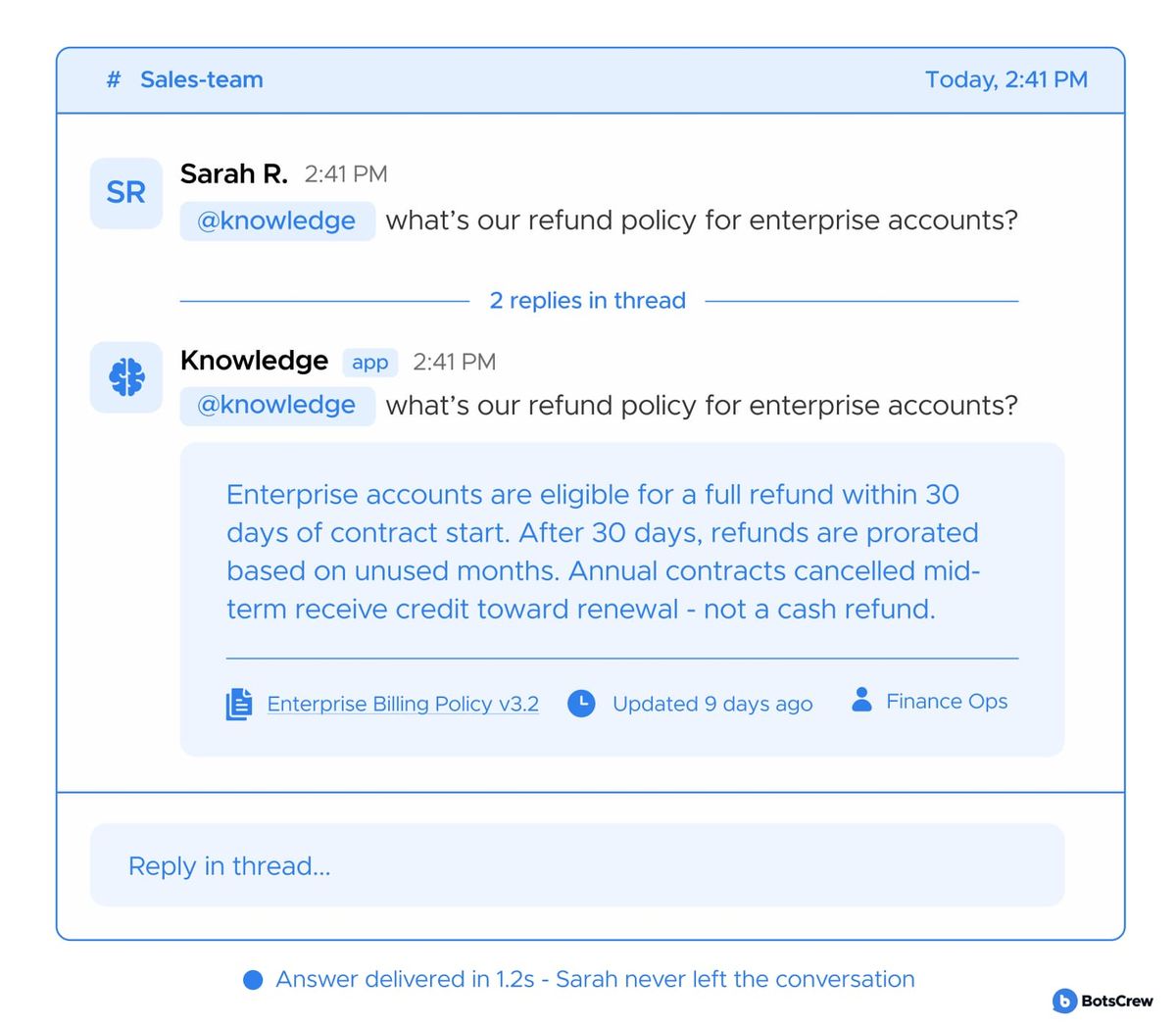
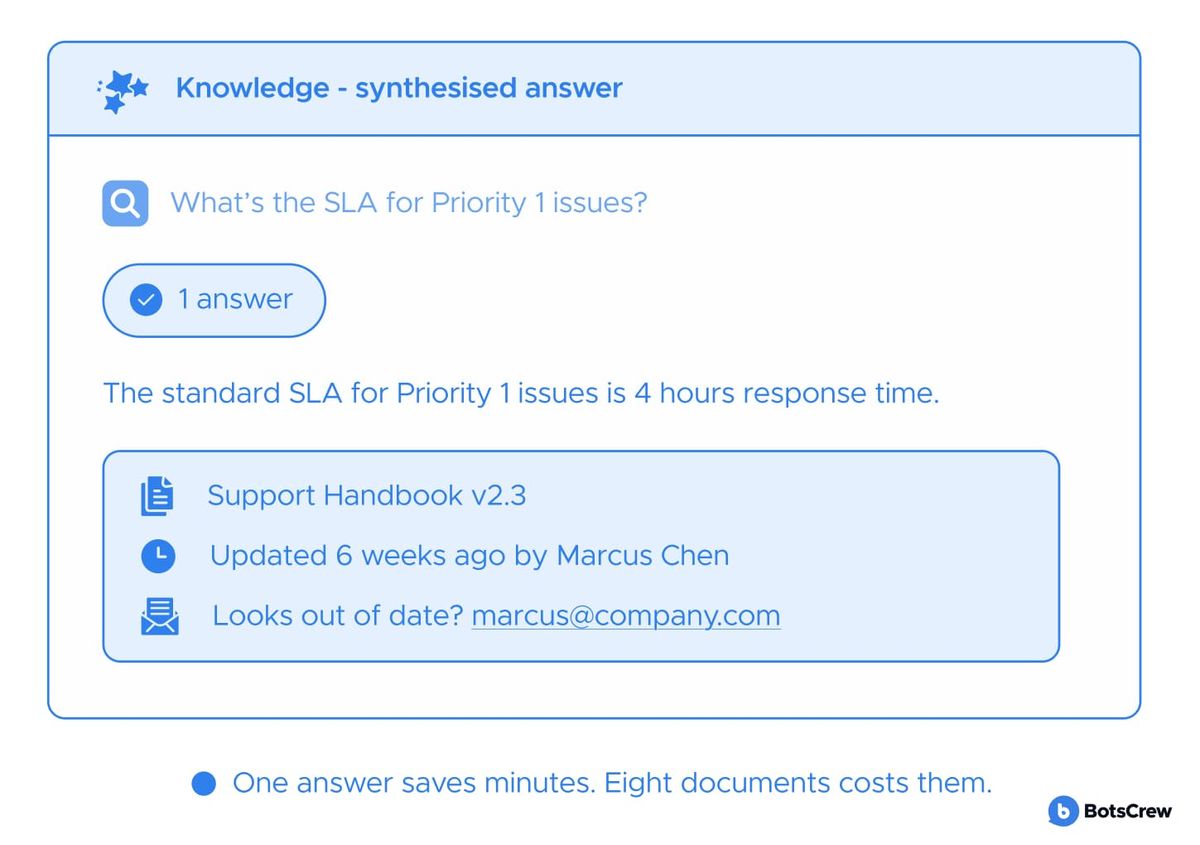
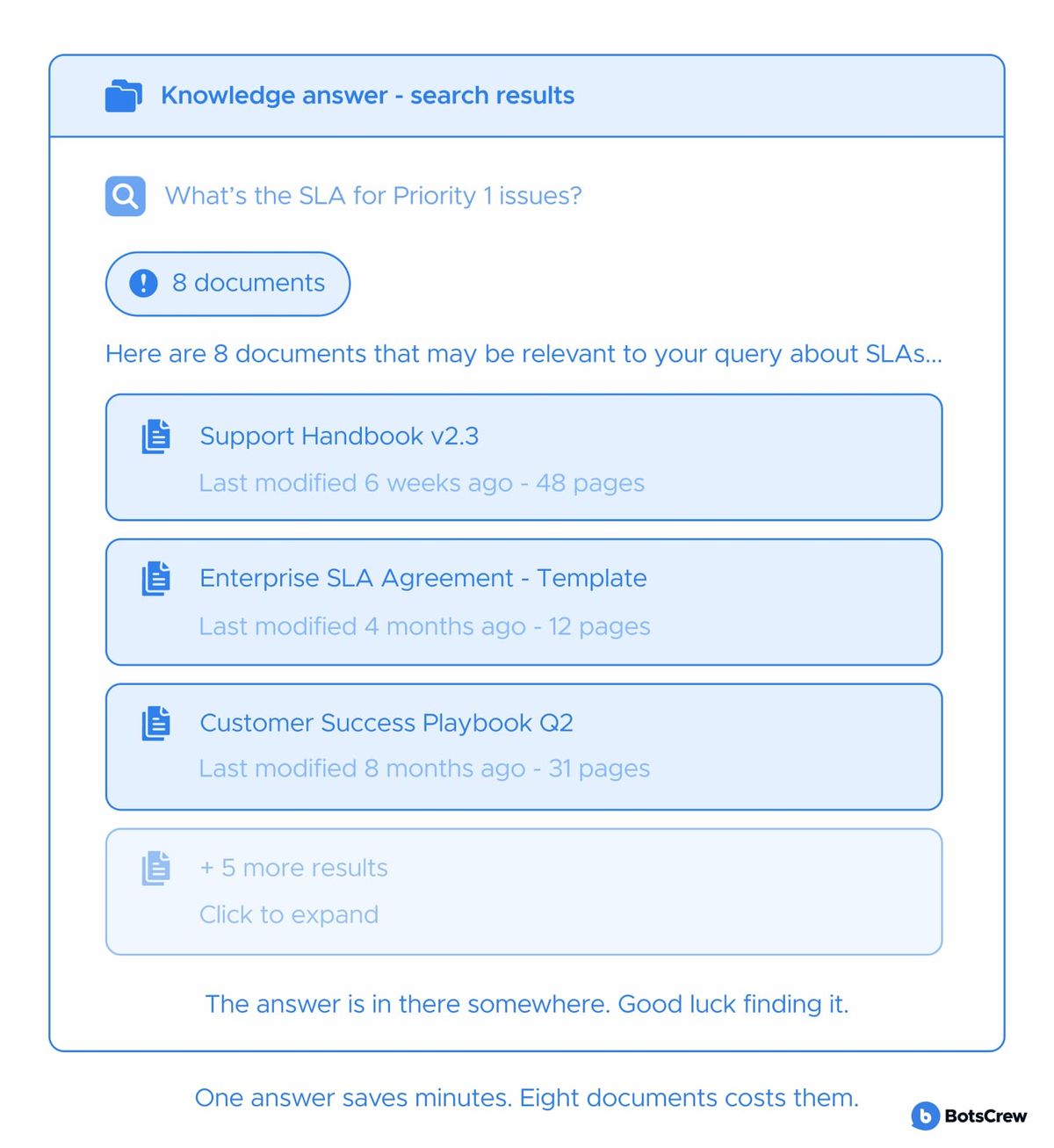
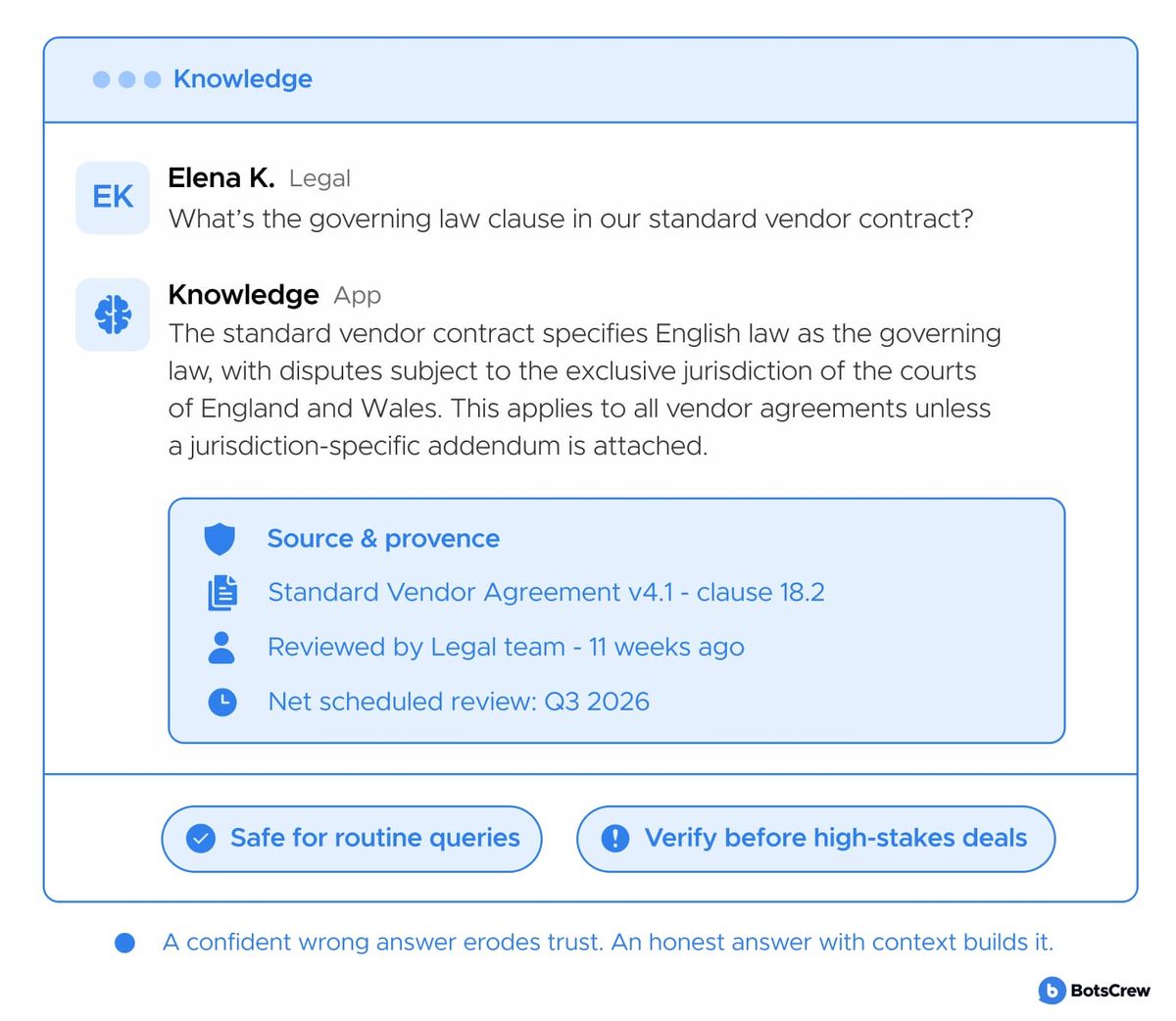
— Returns one confident answer, not a list. With a source, a freshness date, and an owner to contact if something's off. Returning ten search results forces the employee to do the work the system was supposed to do. A synthesized answer — specific, cited, and honest about its limits — is what replaces the Slack message to a colleague.
GOOD
BAD
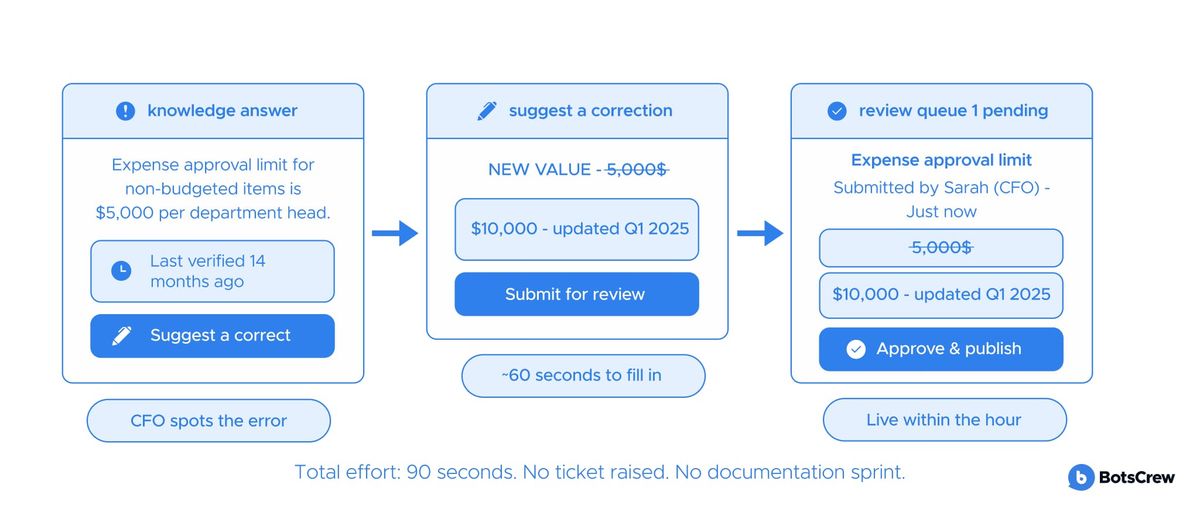
— Gets updated by the people who know. Contribution feels lightweight — not a documentation project. Knowledge goes stale because updating it costs more effort than it's worth. The person who knows the answer should be able to push an update in under a minute, from wherever they already are.
— Builds trust through transparency. "This was last verified 3 weeks ago by Priya" is more useful than a confident wrong answer. Employees do not need the system to be omniscient. They need to know when to trust it and when to verify. Provenance — who wrote it, when it was checked, how it was retrieved — is the thing that makes the answer usable.
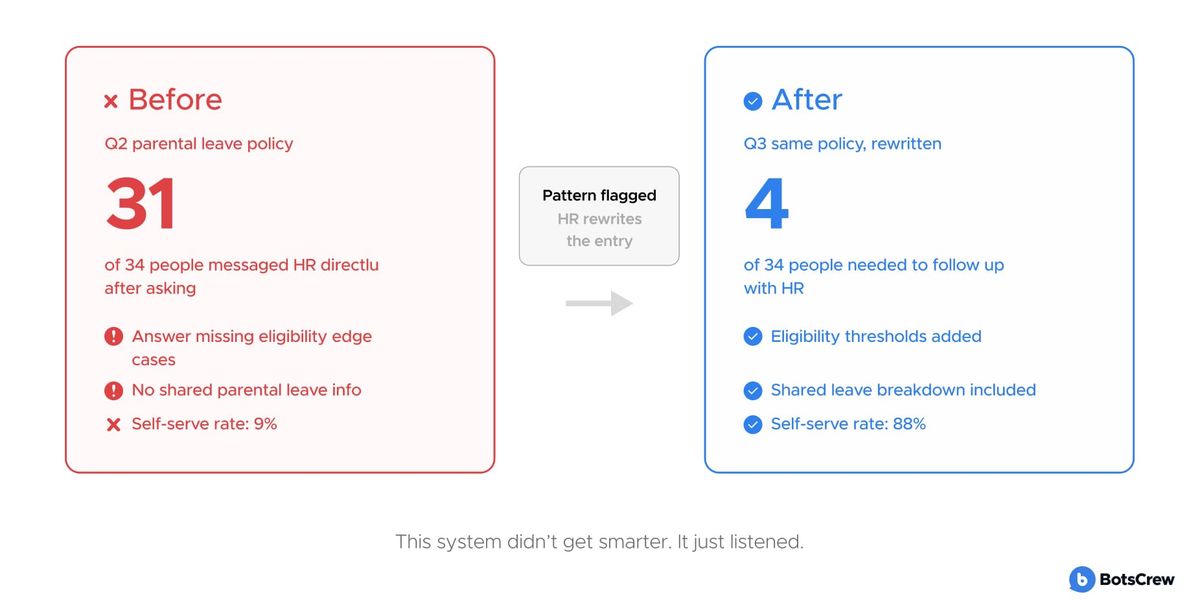
— Learns from every bypass. When Sarah uses Slack instead, that's a signal. Good systems capture it and improve. Every time an employee goes around the knowledge system — pinging a colleague, Googling, asking in a channel — they are revealing a gap. Systems that surface and act on these signals close gaps faster than any editorial team working from assumptions.
Not sure where to start with scoping? BotsCrew has been building conversational AI and enterprise automation systems since 2011. Our team has delivered AI solutions for Fortune 100 organizations across financial services, healthcare, retail, and professional services.
We'll audit your current knowledge infrastructure and give you a candid assessment of where the highest-value opportunities are — no pitch, no obligation.
Book a free 30-min consultation