



AI Agents vs. Copilots vs. Automation: What Should Enterprises Start With?
Enterprises want AI, but choosing between automation, copilots, and agents is not just a technology decision—it’s about process maturity, risk, and readiness. This guide explains the differences and helps leaders decide which approach to start with for the fastest, safest business impact.

AI is still having a hype moment. Every enterprise wants “AI” on the roadmap—but many teams are stuck at the same question: what exactly should we build, and how do we apply AI in real, production workflows?
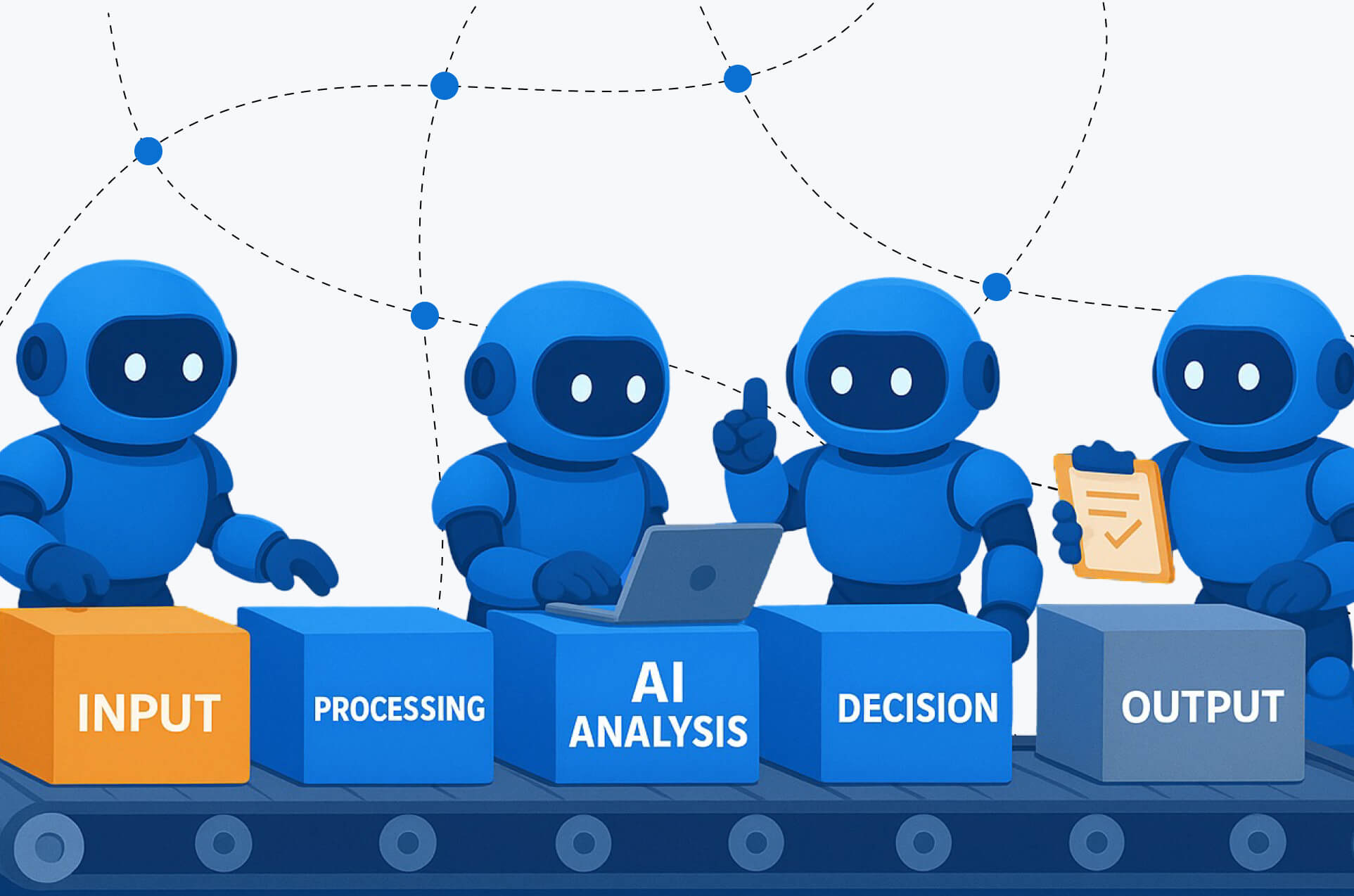
Part of the confusion is that “AI” is used to describe very different approaches: traditional automation, AI copilots, and AI agents. Each can deliver value, but they are not interchangeable. The difference between AI agents vs automation, and between AI agents vs copilots, has major implications for risk, governance, cost, and time to ROI.
Before investing in tools or pilots, enterprise leaders need clarity on three things: how AI automation vs AI agents actually differs, how AI agents vs traditional automation compare in practice, and most importantly, when to use AI agents versus starting with copilots or rule-based automation.
This guide breaks down those differences and provides a practical framework for choosing the right starting point.
TL;DR decision box
Choose your starting point using these rules:
- Start with traditional automation when the process is stable, structured, and rule-based (high volume, low variability).
- Start with copilots when the work is knowledge-heavy and requires human judgment at most steps (lowest-risk adoption path).
- Start with bounded AI agents when the workflow spans multiple tools/systems, policies can be enforced, and you can implement guardrails, approvals, and audit logs.
Most enterprises should sequence like this:
Copilot + automation → bounded agents → scaled orchestration.
Definitions: Automation vs. Copilots vs. AI Agents
Traditional automation (rules-based workflows)
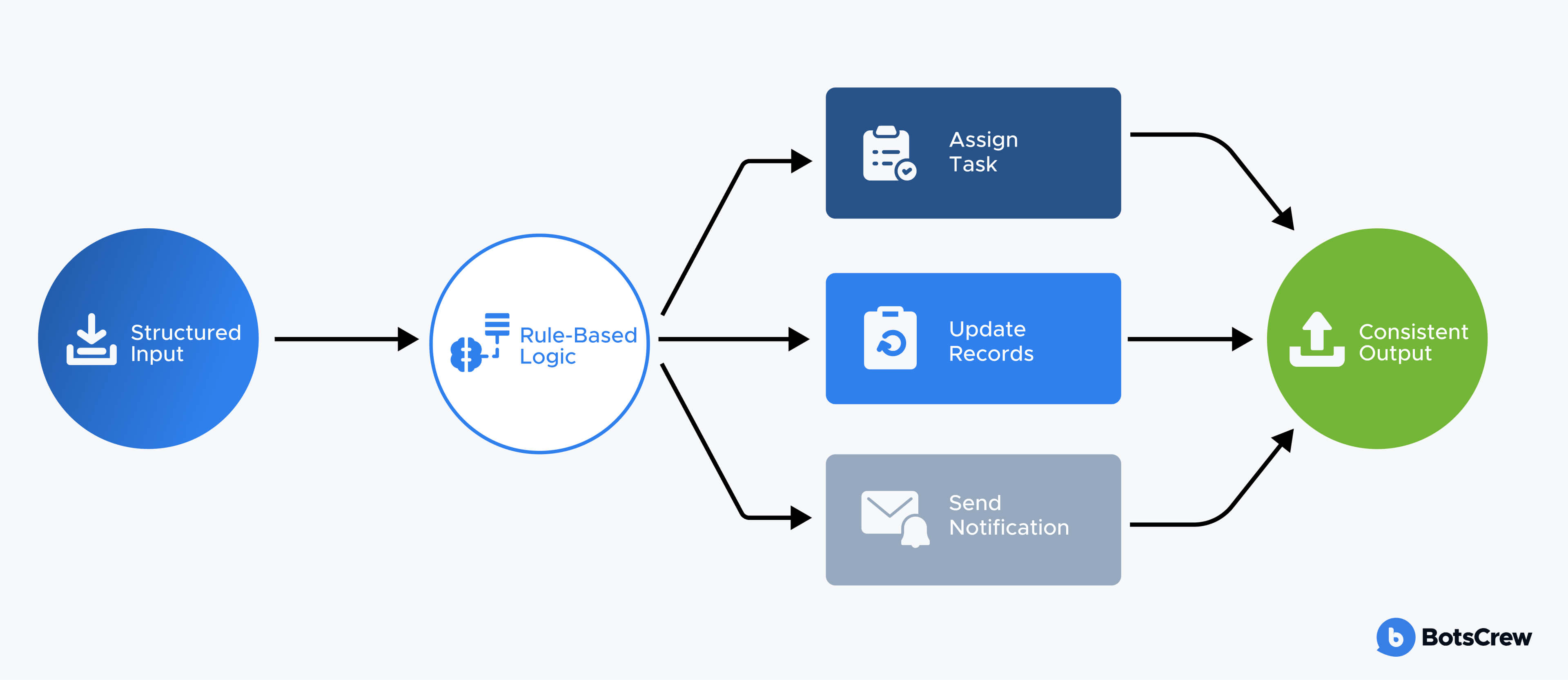
Traditional automation is software that executes a workflow exactly as designed, using predefined rules and logic.
How it works: “If X happens, do Y.”
Example: “If an invoice is over $10,000 → route to Finance Director for approval → if approved, create a PO in the ERP → notify Procurement.”
Good for: High-volume, repeatable tasks with clear rules and structured data—approvals, routing, notifications, data syncing, RPA/BPM workflows, and compliance-heavy processes where predictability matters.
AI copilot
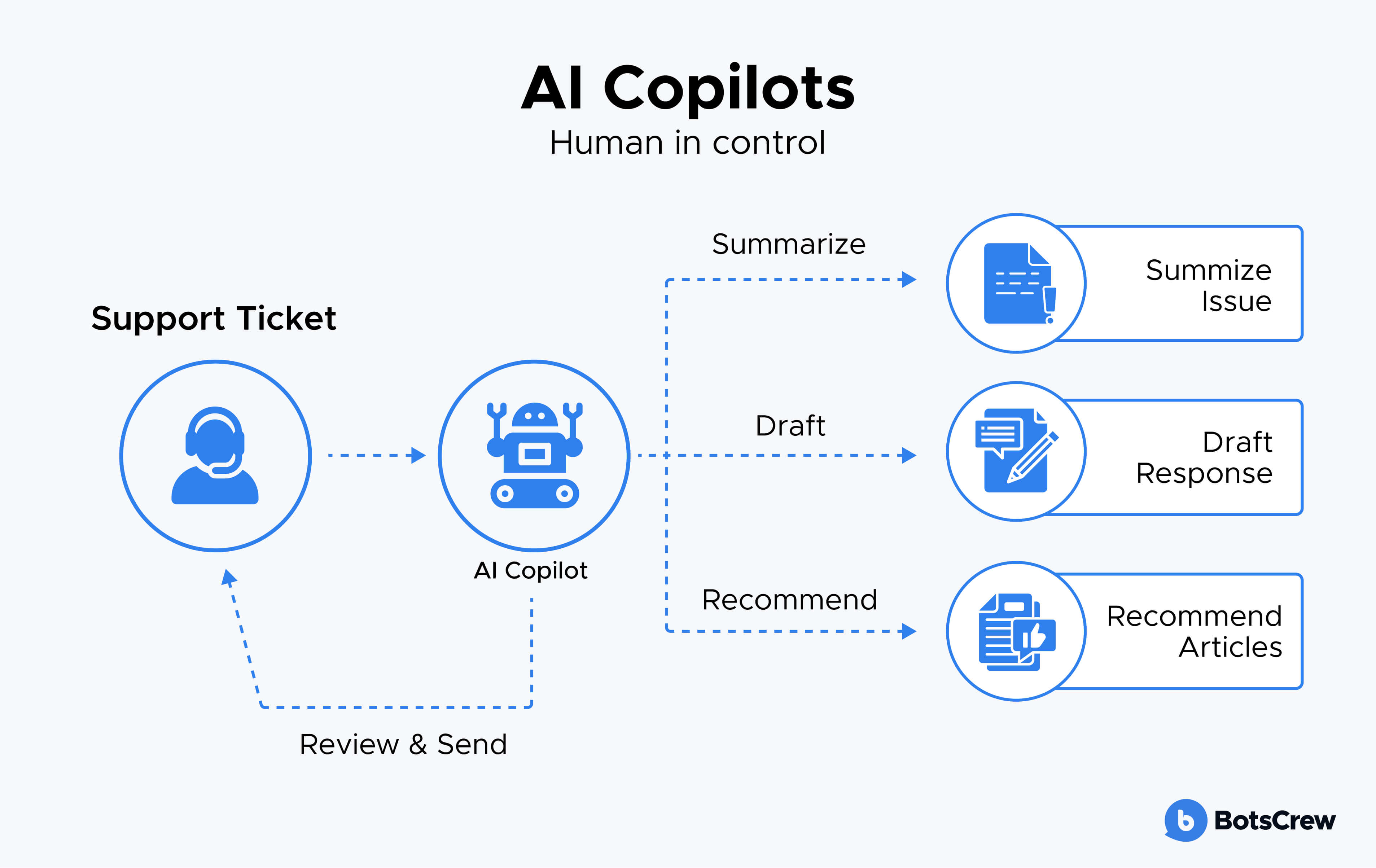
An AI copilot is an assistant that helps employees work faster by drafting, summarizing, searching, and recommending, but the human remains the decision-maker. Copilots are designed to sit inside existing tools (email, CRM, support desk, docs) and reduce time spent on reading, writing, and finding information. They’re usually the easiest entry point because they don’t need full autonomy: they accelerate people rather than replacing their judgment.
Example: A support rep opens a ticket and the copilot: summarizes the customer issue, pulls relevant knowledge base articles, suggests a reply, and proposes next steps—then the rep reviews, edits, and sends.
Good for: Knowledge work and decision support—customer support assistance, sales enablement, internal policy/Q&A, meeting notes and follow-ups, summarizing analytics, and preparing briefs—especially when you want fast productivity gains with lower operational risk.
AI agent
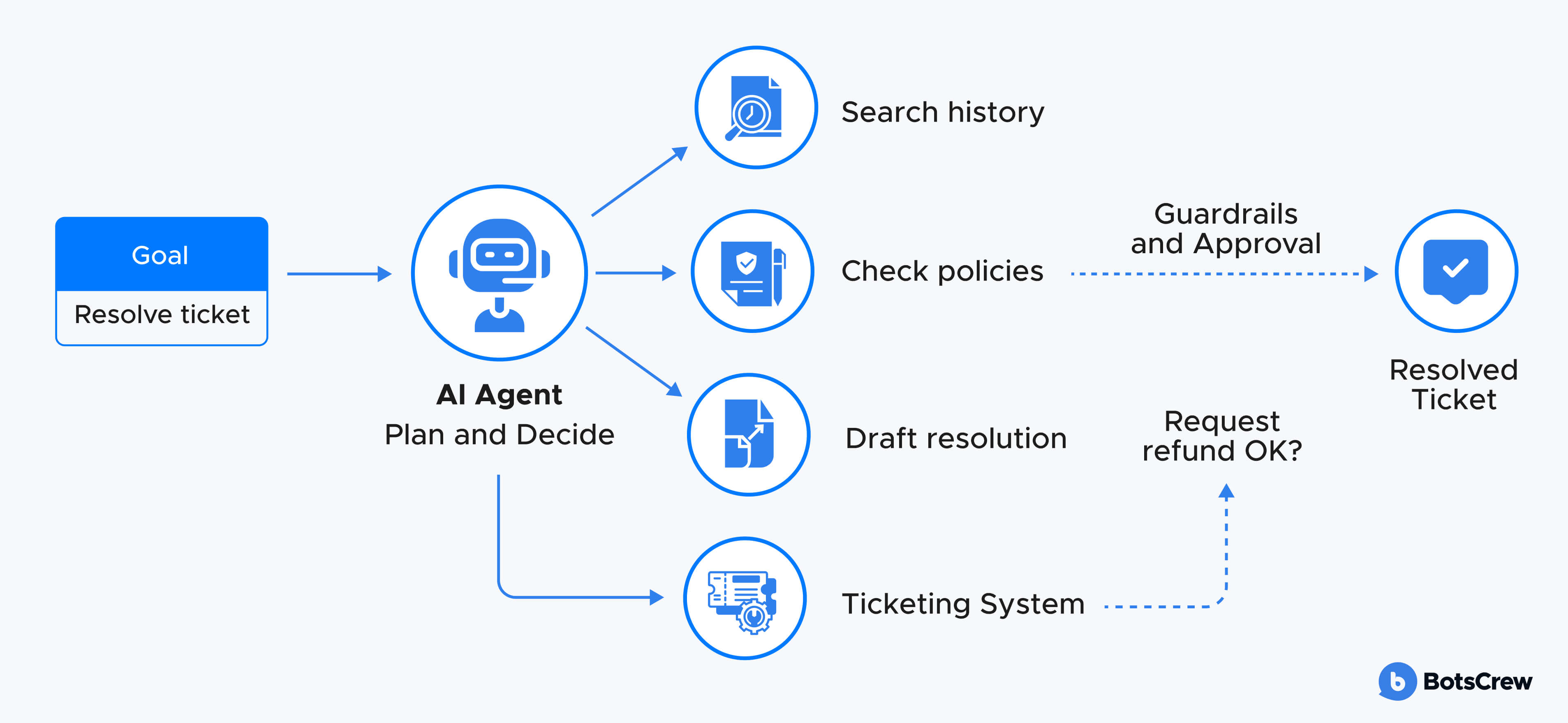
An AI agent is a goal-driven system that can do more than suggest—it can plan steps and take actions across tools to complete a task, within defined guardrails. Instead of “here’s a draft,” an agent can coordinate work end-to-end: decide what information it needs, retrieve it, choose a sequence of actions, and execute those actions through APIs (or other tools). In an enterprise setting, a production-ready agent is rarely “fully autonomous.”
Example: “Handle this renewal risk.” The agent: checks account history in CRM → reviews recent support tickets → summarizes sentiment → drafts an outreach plan → creates tasks for the AE → prepares an email draft → requests approval before sending or making any customer-facing change → logs every step.
Good for: Multi-step workflows that cross systems (CRM + ticketing + knowledge base + email + internal docs), especially where inputs are unstructured and exceptions are common—but actions can be constrained by policy. Common starting points include triage/routing, resolution drafting with controlled updates, internal ops coordination, and agent-led workflows that trigger deterministic automations.
Difference in a few words
- Automation: rules execute steps
- Copilot: AI suggests, human acts
- Agent: AI pursues a goal and can act (with guardrails)
AI Agents vs Copilots: How They Differ in Enterprise Workflows
Although both rely on the same foundation models, copilots and agents play very different roles in enterprise workflows. The difference is not primarily technical. It’s about who owns the outcome, who takes action, and how much risk the system is allowed to carry.
What is the core difference?
A copilot supports a human. It helps with thinking, writing, searching, and summarizing, but the person remains responsible for decisions and execution.
An AI agent is goal-driven. It can plan steps and, within defined guardrails, take actions across systems to move a task to completion.
Put simply: a copilot accelerates people, while an agent orchestrates work.
When to use a copilot
Copilots are the right starting point when work is knowledge-heavy and judgment-driven, and when keeping humans in control is essential. This includes functions like customer support, sales, marketing, analytics, legal, and internal research.
They are also ideal when:
- You want fast time-to-value with minimal integration.
- Processes are not yet fully standardized.
- You need low operational risk and easier governance.
Copilots usually deliver quicker ROI because they can be rolled out inside existing tools and immediately reduce time spent on reading, writing, and information search.
When to use an AI agent
Agents make sense when the bottleneck is no longer thinking, but coordination and execution across systems. They are best suited for multi-step workflows that span tools and follow clear policies—such as ticket resolution, lead routing, contract intake, or internal operations coordination.
Agents are most valuable when:
- A task requires planning and sequencing, not just suggestions.
- Actions can be bounded by permissions and approval flows.
- You can log, monitor, and audit every step.
Their impact is typically larger but takes longer to realize, because building agents requires more design, integration, and governance.
Cost, complexity, and ROI
From an implementation standpoint, copilots are usually cheaper and faster to deploy. They require less workflow redesign and lighter security and compliance controls. As a result, they tend to show ROI in weeks rather than months.
Agents, by contrast, involve higher upfront cost and complexity. They need process modeling, tool integration, permissioning, approval mechanisms, and continuous evaluation. Their ROI often comes later, but it is typically broader and more durable, because they reduce end-to-end cycle time and eliminate entire layers of manual coordination.
A practical decision rule
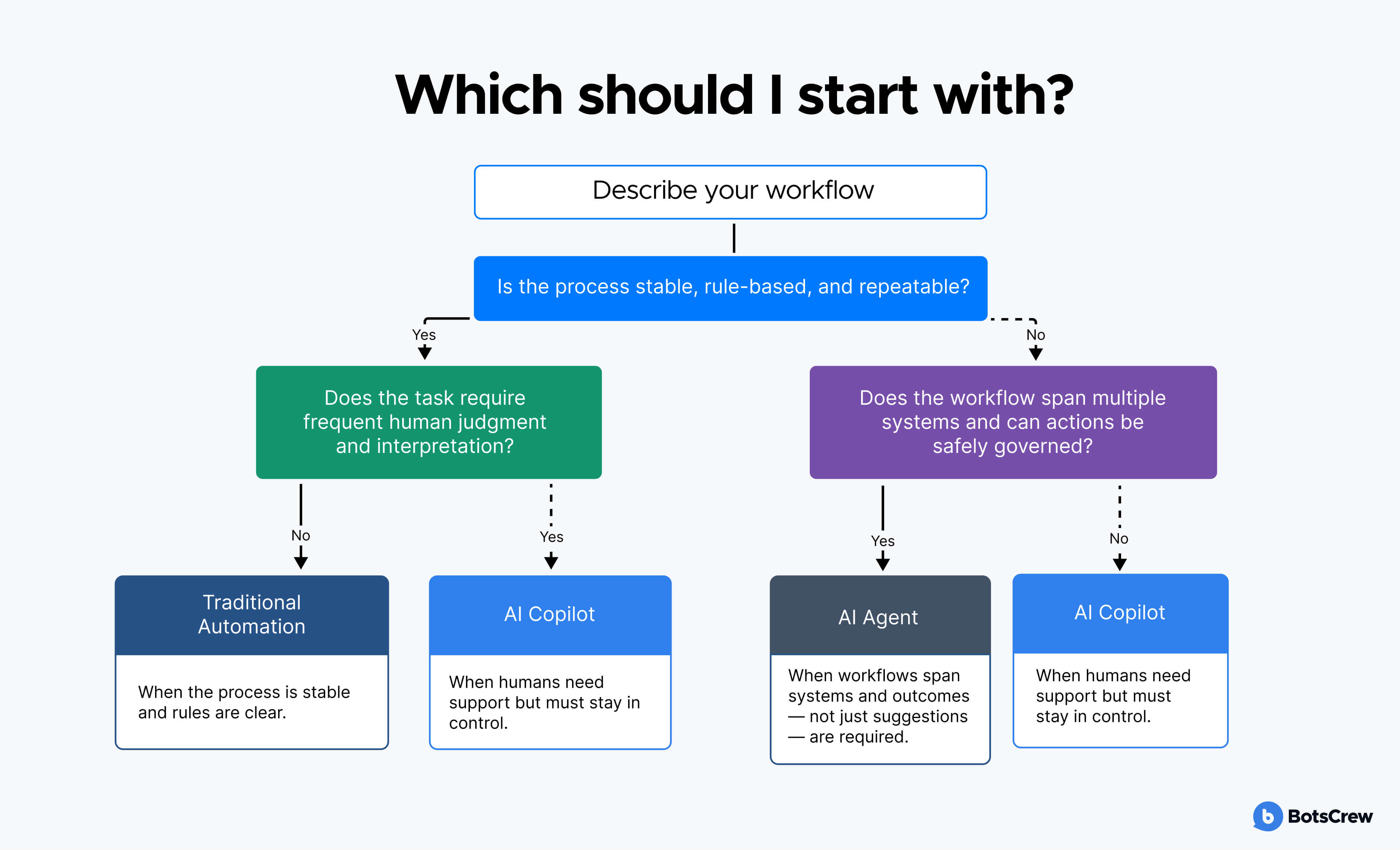
Three questions help determine where to start:
- Should a human or the system own the final action?
- Does the workflow span multiple tools and steps?
- Can risk be bounded with policies, approvals, and audit trails?
If humans must remain in control and the goal is productivity, start with a copilot.
If the workflow is cross-system and can be safely governed, an agent can take on orchestration.
AI Agents vs Traditional Automation: What’s Actually Different
What is the core difference?
Traditional automation follows predefined rules and workflows. It executes the same steps every time a condition is met. It does not reason about context; it simply applies logic that humans have encoded in advance.
AI agents, by contrast, are goal-driven. Instead of only following fixed paths, they can interpret context, decide which steps are needed, and choose how to sequence actions across tools—within defined policies and guardrails.
In short: automation executes known rules, while agents handle situations where the rules are incomplete and context matters.
When to use traditional automation
Traditional automation is the right choice when processes are stable, well-documented, and highly repeatable. It excels in environments where predictability and compliance are critical, such as finance operations, procurement approvals, data synchronization, and regulatory reporting.
It works best when:
- Inputs are structured and consistent.
- Exception rates are low.
- The same steps apply in almost every case.
- Deterministic behavior and auditability are required.
In these scenarios, rule-based workflows are reliable, easy to test, and easier to certify from a compliance perspective.
When not to use traditional automation
Traditional automation breaks down when variability becomes high and when the number of exceptions starts to rival the number of “standard” cases. In such environments, maintaining rules becomes expensive and brittle.
Agents, on the other hand, should not be used when the process is simple, highly regulated, and already well-covered by deterministic workflows. Introducing agentic reasoning there adds complexity without proportional benefit and can make compliance harder rather than easier.
Cost, complexity, and ROI
Traditional automation is usually cheaper and faster to implement. The tooling is mature, the behavior is predictable, and governance models are well understood. ROI often comes quickly through labor savings and reduced error rates in high-volume processes.
Agents require higher upfront investment. They involve model integration, tool orchestration, permission management, monitoring, and continuous evaluation. As a result, time-to-value is typically longer. However, their potential ROI is also broader, because they can reduce end-to-end cycle time and handle work that could not be fully automated before.
A practical decision rule
Ask whether the process can be fully described as a set of stable rules.
- If yes, traditional automation is usually the simplest and safest option.
- If no—because context, interpretation, and exceptions dominate—an agent-based approach becomes more appropriate, provided governance and guardrails are in place.
Decision Framework: When to Use AI Agents, Copilots, or Automation
Choosing between AI agents vs automation vs copilots is not about technology trends. It depends on three factors: process maturity, risk, and operational readiness.
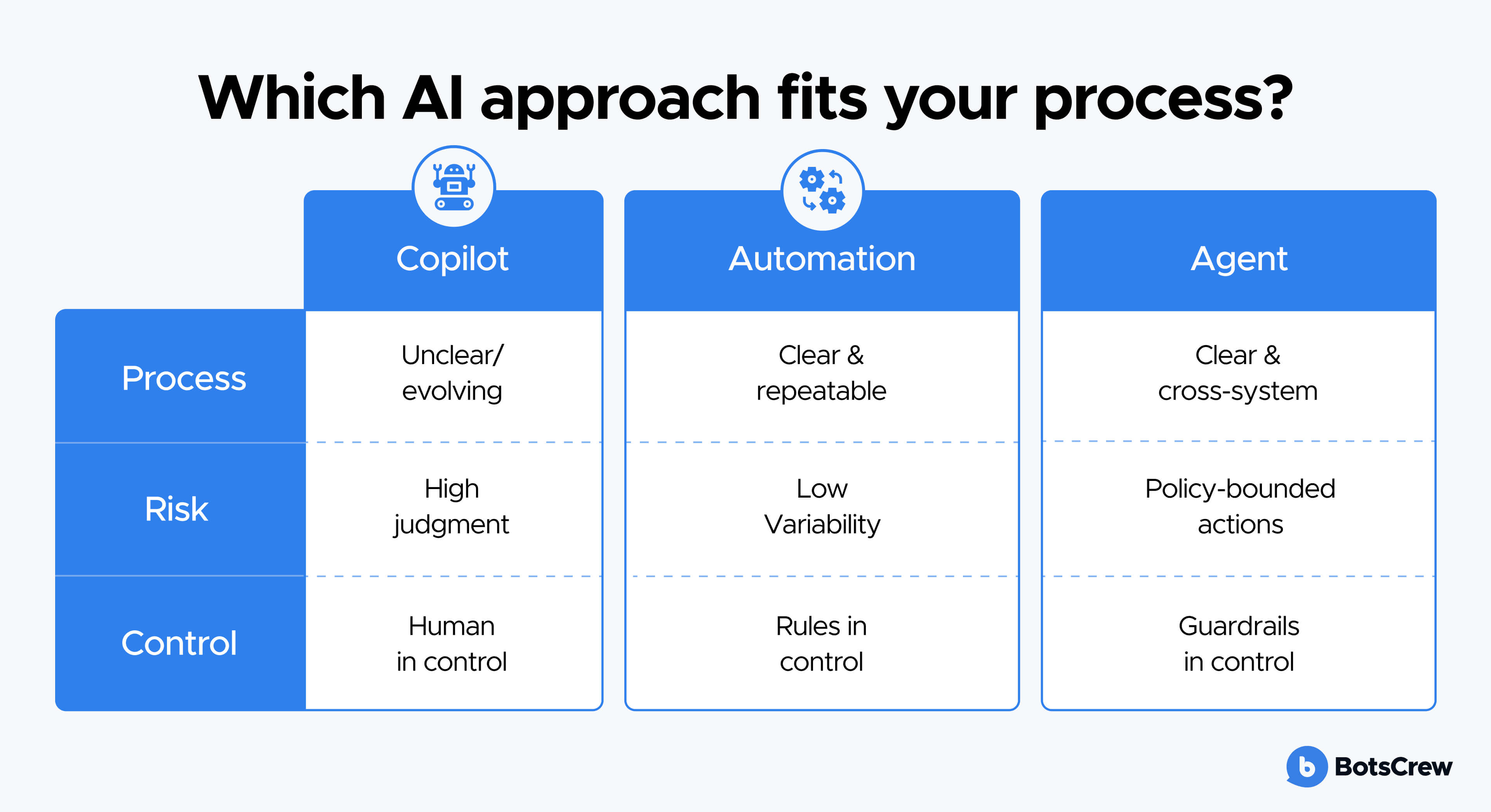
1. Process maturity
If a process is unclear, evolving, and highly dependent on human judgment, a copilot is usually the safest starting point. This is common in knowledge work where interpretation and decision-making dominate.
If a process is clear, repeatable, and rule-based, traditional automation is often the most efficient choice. In the comparison of AI agents vs traditional automation, automation wins when steps are stable and exceptions are rare.
If a process is clear but complex, spans multiple systems, and involves many handoffs, this is where AI agents vs automation becomes relevant. Agents can orchestrate such workflows, provided guardrails and approvals are in place.
In simple terms:
- Unclear or evolving process → Copilot
- Clear and repeatable process → Automation
- Clear but complex, cross-system process → Agent (with guardrails)
2. Risk and control
Next, consider the cost of a mistake. What happens if the system takes the wrong action? Is it a minor inefficiency, or does it affect revenue, compliance, or customer trust?
When the impact of errors is high and decisions must be reviewed, copilots are the safest entry point because humans stay fully in control. Automation is appropriate when rules are well understood and exceptions are rare. Agents should only be introduced when you can bound their actions with permissions, approval flows, and audit trails, so that nothing critical happens without oversight.
A useful rule of thumb:
- High risk, high judgment → Copilot
- High risk, low variability → Automation
- Bounded risk, governed actions → Agent
3. Data and tool readiness
Finally, assess whether your systems are ready to be connected and controlled. Do you have clean access to the right data? Are APIs available? Can you enforce least-privilege permissions and log every action?
Copilots can deliver value even when data and integrations are imperfect, because they primarily assist users inside existing tools. Automation and especially agents require a higher level of technical and governance readiness, since they interact directly with systems of record.
In practice, the safest and most common sequence is:
Copilots to drive adoption and insight → Automation to standardize execution → Bounded agents to orchestrate at scale.
Want to validate which processes are best for automation, copilots, or agents in your organization? Book a 30-minute consultation with our AI experts.
Case-style examples: how enterprises typically apply each approach
To make the differences more concrete, here are a few simplified, real-world scenarios showing how the same business problem looks when solved with automation, a copilot, or an agent.
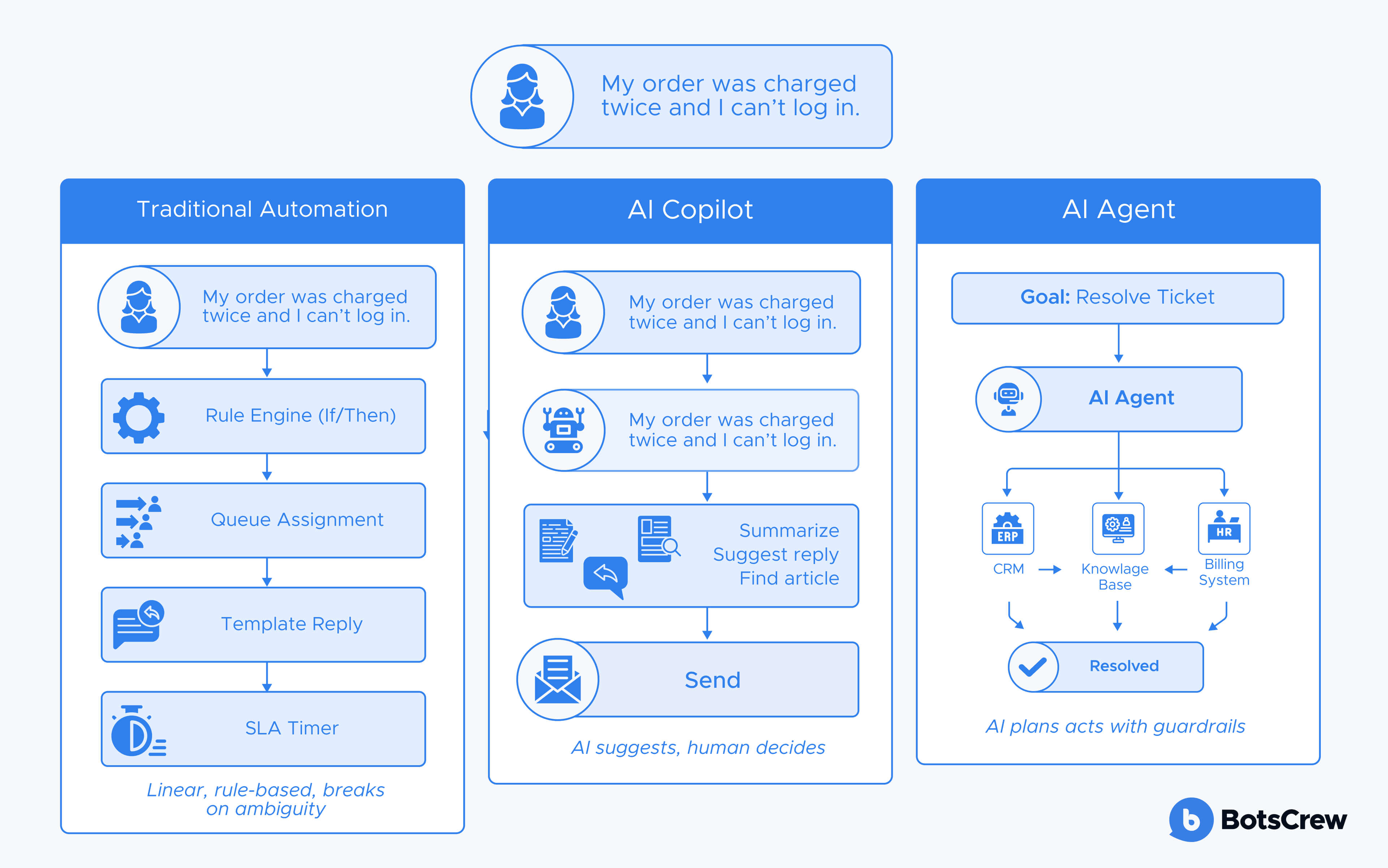
Example 1: Customer support ticket handling
With traditional automation, incoming tickets are routed using rules: keywords, categories, priority levels. The system assigns the ticket to a queue, sends a template acknowledgment, and escalates if an SLA is about to be missed. This works well when issues are predictable and categories are clear, but it struggles when customer messages are ambiguous or span multiple topics.
With an AI copilot, a support agent opens a ticket and the copilot summarizes the issue, pulls relevant knowledge-base articles, and drafts a response. The agent reviews, edits, and sends it. The quality and speed improve, but the overall process still depends on manual handoffs and individual execution.
With an AI agent, the system can take a goal such as “resolve this ticket.” It analyzes the message, checks the customer’s history, searches the knowledge base, drafts a solution, updates the ticket, and—if a refund or exception is required—requests approval before acting. The agent orchestrates the flow across systems, while humans stay in the loop for high-impact decisions.
Example 2: Internal operations and reporting
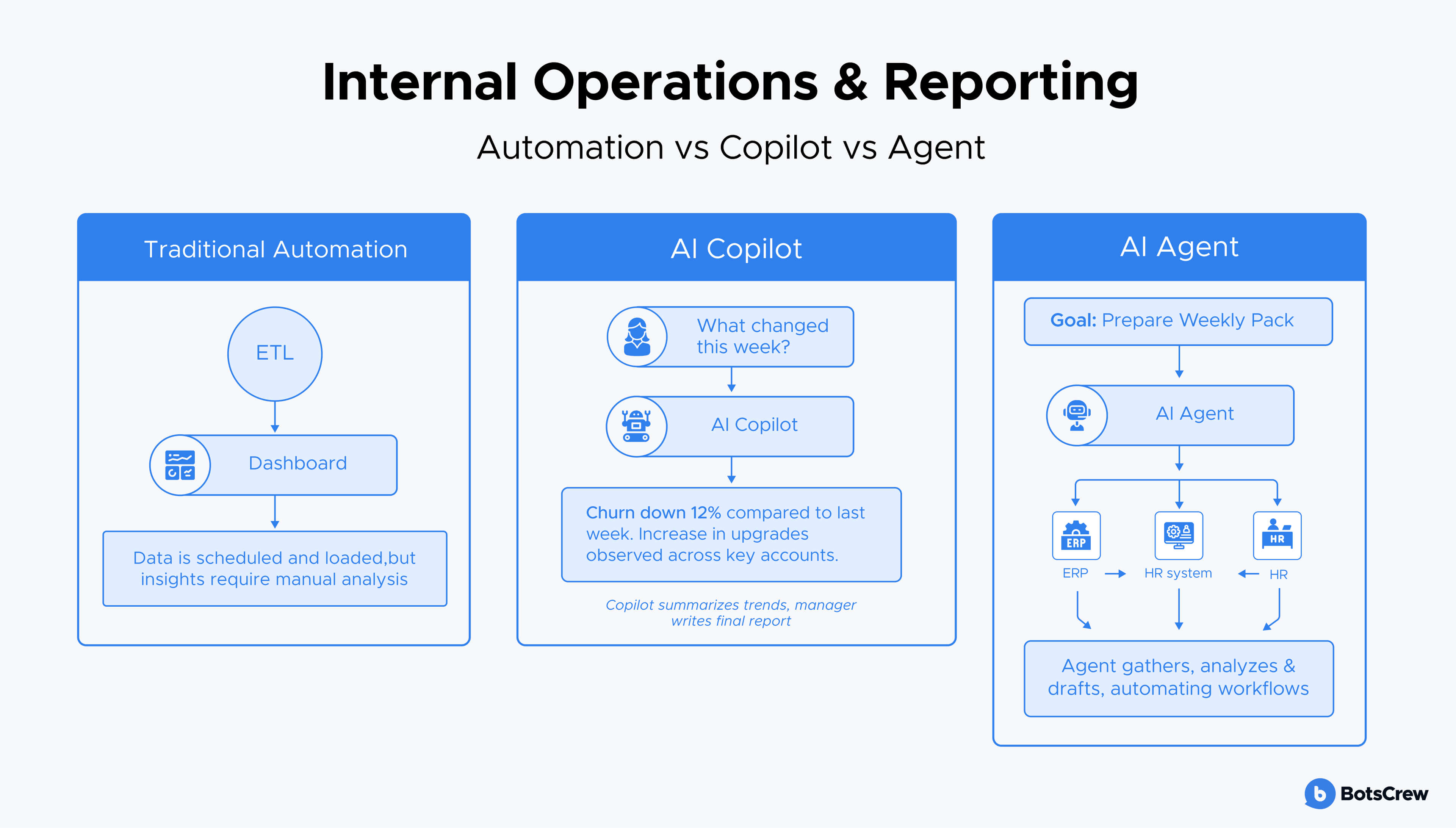
Using automation, data is pulled from source systems on a schedule, transformed, and loaded into dashboards. Reports are generated the same way every time, but insights still require manual interpretation.
With a copilot, managers can ask questions in natural language: “What changed in churn this week?” The copilot summarizes trends and drafts commentary, but the manager still compiles the final report.
With an agent, the system can be tasked with “prepare the weekly performance pack.” It gathers data, checks anomalies, drafts insights, updates slides, assigns follow-ups to owners, and flags risks—asking for review before distribution.
Conclusion
The real challenge for enterprises is not choosing between hype and no hype, but choosing between AI automation vs AI agents vs copilots in a way that matches their process maturity and risk profile.
Traditional automation remains the safest path for stable, rule-based workflows. Copilots are the fastest way to boost knowledge-worker productivity while keeping humans in control. AI agents, when deployed with proper guardrails, enable orchestration across complex, cross-system processes and deliver compounding operational impact.
The strategic question is no longer whether to use agents, but when to use AI agents—and when to rely on copilots or traditional automation first. The most successful enterprises start with assistance, move to standardization, and only then introduce bounded autonomy, following a deliberate progression from AI agents vs traditional automation to full agentic orchestration.
If you’re deciding where to start—or how to move from pilots to production—we can help you:
1. Prioritize the right use cases
Assess your processes, risk profile, and data readiness to determine whether automation, copilots, or agents will deliver the fastest and safest ROI.
2. Design a 3-6-12 month AI roadmap
Define a phased plan that moves from quick wins to scalable, governed AI workflows.
3. Deploy with enterprise-grade guardrails
Ensure security, compliance, auditability, and human-in-the-loop controls are built in from day one.
Not sure where to start—automation, copilots, or agents? We help enterprises map the right AI approach to real workflows, risk levels, and ROI expectations.